Dirk Leitloff
Participant
February 3, 2024
Answered

Cloud Speicher

  • February 3, 2024
  • 1 reply
  • 663 views

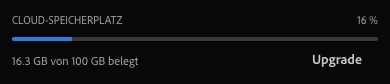
Hallo, der Dienst mit den synchronisirten Daten wurde ja jetzt eingetellt. Ich hatte davor alle Daten schon entfernt. Ich kann jetzt nicht nachvollziegen wieso noch 16% belegt sein sollten. Es werden auch keine Daten (die insgesamt diese Größe aufweisen) angezeigt.


Weiß jemand wie sich das erklären lässt? Ich hätte gern alles restlos gelöscht.
 

This topic has been closed for replies.
Correct answer kglad

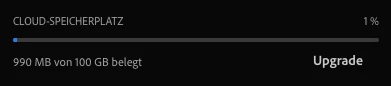
Heute wurde es mir so angezeigt. Das sieht schon realistischer aus. 🙂


it just "self-corrected"?

1 reply

kglad
Community Expert
Community Expert
February 3, 2024

the sync's not "off" for everyone, yet.

Dirk Leitloff
Participant
February 6, 2024

Ich habe die Daten vorher schon gelöscht und der angezeigte Ordner ist auch leer. Naja es gilt wohl abzuwarten.

kglad
Community Expert
Community Expert
February 7, 2024

maybe you're looking at the storage occupied by other cloud files.


use a web browser to navigate to the following locations. at each location there are several folders/link to check.:


https://assets.adobe.com

https://lightroom.adobe.com

https://documentcloud.adobe.com

https://spark.adobe.com


if you delete anything from any of these locations, check for a deleted folder where your file(s) was (were) moved. if you want to clear space you must delete files in the deleted folder. the used storage shown at each of those four sites (when totaled), should match the space shown used by your cc files.