Participant
January 10, 2023
Question

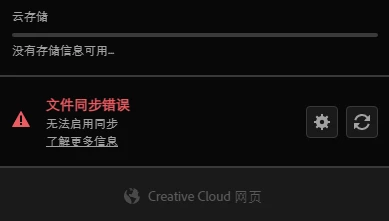
Cloud storageIs not stored
  • January 10, 2023
  • 2 replies
  • 147 views

My online account is worked, but not the creative Cloud Desktop

Cloud storageIs not stored

File synchronization error

can't enable synchronization for more information

 

This topic has been closed for replies.

2 replies

kglad
Community Expert
Community Expert
January 11, 2023

reset the cc desktop app by making sure it's in the foreground, then press:

Win: Ctrl + Alt + R
Mac: Cmd + Opt + R

John T Smith
Community Expert
Community Expert
January 10, 2023

File Sync Links that may help... all the links I have, since I don't know the cause of your specific problem
-NOTE that I do not use cloud storage, so these links are saved from reading previous discussions
-About cloud storage https://helpx.adobe.com/creative-cloud/help/about-cloud-documents.html
-This has a link about how to delete files
--https://community.adobe.com/t5/creative-cloud-services-discussions/can-t-permanently-delete-files-from-my-creative-cloud-storage/m-p/13134959
-FAQ https://community.adobe.com/t5/Get-Started/Helpful-Links-FAQ-Where-can-I-find-links-about-managing-and/td-p/7570118
-http://helpx.adobe.com/creative-cloud/help/sync-settings.html
-http://helpx.adobe.com/creative-cloud/kb/arent-my-files-syncing.html
-sync and email link https://community.adobe.com/t5/Get-Started/Email-link-of-file-in-personal-CC-folder/td-p/5944719
-an overview of assets https://assets.adobe.com/files
-File sharing https://community.adobe.com/t5/Get-Started/Does-Creative-Cloud-support-sharing-videos/td-p/7113392