

Grégori
Participant
March 4, 2026
Answered

Comment désactiver la modification globale du bandeau de navigation dans Adobe Portfolio

  • March 4, 2026
  • 2 replies
  • 15 views

Bonjour,


Je suis en train de créer mon portfolio via Adobe Portfolio.

Je suis vidéaste ayant deux spécialisations : l’immobilier et l’évènementiel. Je veux créer un onglet pour chacune de ces deux catégories, afin de ne pas mélanger les projets.

Pour l’onglet immobilier, je veux un thème général clair : arrière-plan blanc, titres noirs.

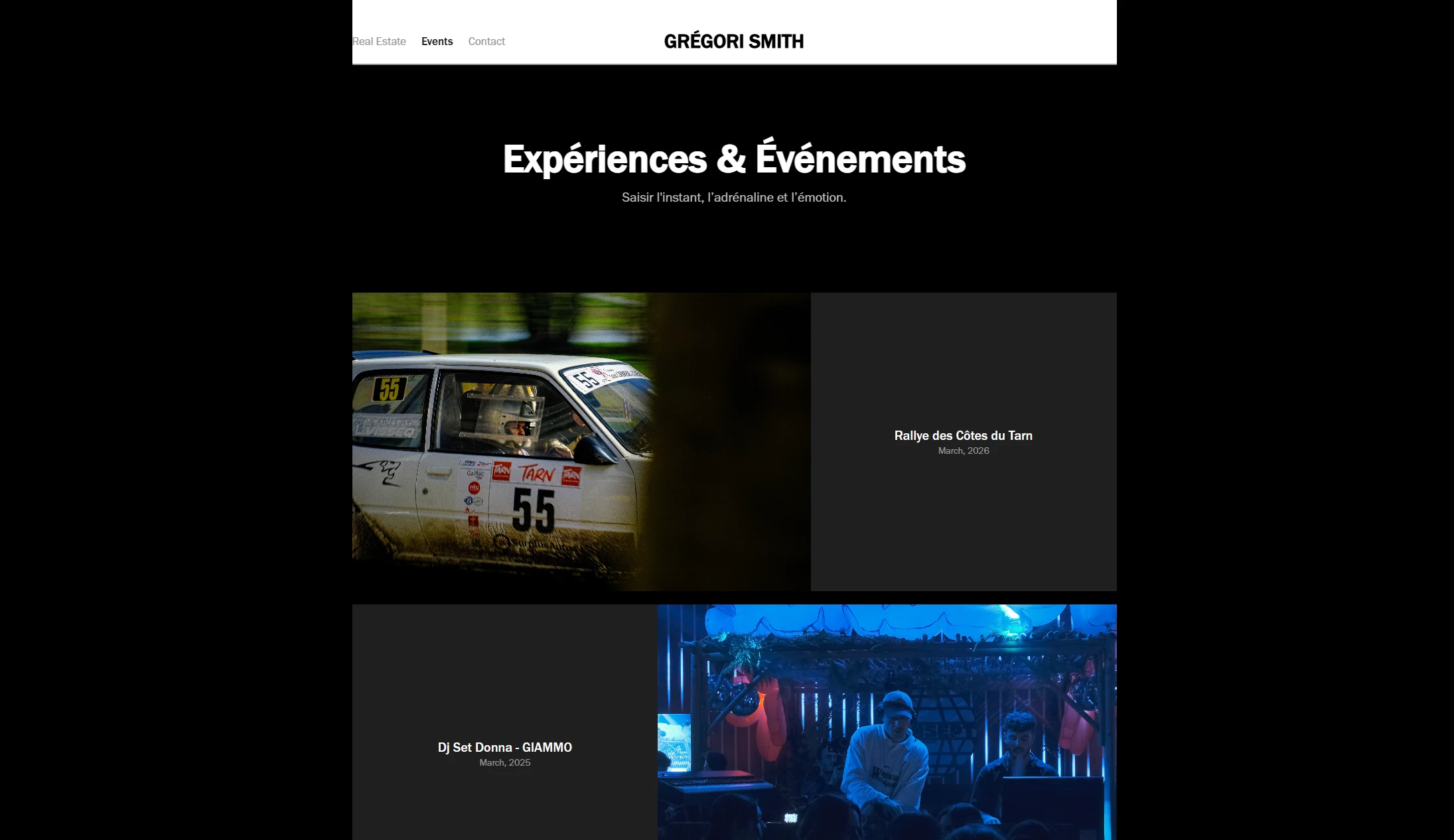
Pour l’onglet évènementiel je veux l’inverse, donc un thème général sombre : arrière-plan noir, titres blancs.

Mon problème est le suivant : le conteneur de navigation, tout en haut, incluant les onglets, le titre du site et la bordure inférieure. Les modifications que j’apporte à ces éléments s’appliquent au site entier, et je n’ai pas l’impression de pouvoir désactiver les modifications globales sur ce conteneur.

Voici le message qui s’affiche dans leur panneau de modification :

“Avertissement : Vous modifiez les styles globaux de toutes les pages.”
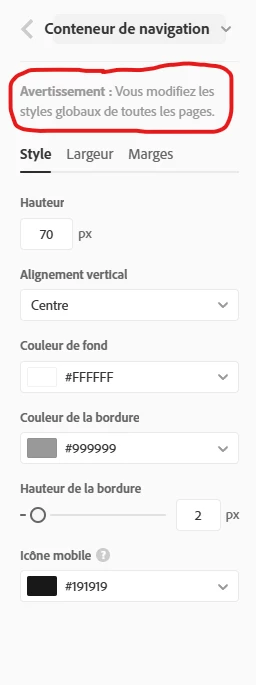


Sur les autres conteneurs (bannière, etc.), je peux choisir d’appliquer les personnalisations uniquement à la page actuelle, mais pas sur le conteneur de navigation, ni le logo.

Serai-je passé à côté de quelque chose, ou n’est-il vraiment pas possible de personnaliser le conteneur de navigation en fonction de chaque onglet ?



Merci d’avance

    Correct answer John T Smith

    Portfolio does not have a forum here for support... these links I've saved may help
    Technical support: https://help.myportfolio.com/hc/requests/new?ticket_form_id=177168
    https://help.myportfolio.com/hc/en-us/articles/360036484493-Contact-Form-module
    Faq: https://help.myportfolio.com/hc/en-us
    Getting Started: https://helpx.adobe.com/creative-cloud/how-to/create-portfolio-website.html
    Choose a Theme: https://portfolio.adobe.com/themes
    Theme Features: https://help.myportfolio.com/hc/articles/360035995733-Themes-features
    Migrate to a new page: https://help.myportfolio.com/hc/en-us/articles/10872890414235-Migrate-Adobe-Portfolio-sites-to-another-account-Overview
    Lighrtroom Integrations
    https://blogs.adobe.com/jkost/tag/portfolio
    https://lightroomkillertips.com/getting-images-lightroom-adobe-portfolio-just-got-lot-easier/
    https://digital-photography-school.com/create-beautiful-online-gallery-lightroom-classic-cc-adobe-portfolio-15-minutes/
    Custom Domain
    https://help.myportfolio.com/hc/en-us/articles/216489627-Manually-configuring-a-custom-domain
    https://help.myportfolio.com/hc/en-us/articles/209448927-Using-a-custom-domain-with-Adobe-Portfolio
     

    2 replies

    kglad
    Community Expert
    Community Expert
    March 5, 2026

    portfolio questions: https://help.myportfolio.com/hc/en-us/requests/new?ticket_form_id=177168


    portfolio faq: https://help.myportfolio.com/hc/en-us

    John T Smith
    Community Expert
    John T SmithCommunity ExpertCorrect answer
    Community Expert
    March 4, 2026

    Portfolio does not have a forum here for support... these links I've saved may help
    Technical support: https://help.myportfolio.com/hc/requests/new?ticket_form_id=177168
    https://help.myportfolio.com/hc/en-us/articles/360036484493-Contact-Form-module
    Faq: https://help.myportfolio.com/hc/en-us
    Getting Started: https://helpx.adobe.com/creative-cloud/how-to/create-portfolio-website.html
    Choose a Theme: https://portfolio.adobe.com/themes
    Theme Features: https://help.myportfolio.com/hc/articles/360035995733-Themes-features
    Migrate to a new page: https://help.myportfolio.com/hc/en-us/articles/10872890414235-Migrate-Adobe-Portfolio-sites-to-another-account-Overview
    Lighrtroom Integrations
    https://blogs.adobe.com/jkost/tag/portfolio
    https://lightroomkillertips.com/getting-images-lightroom-adobe-portfolio-just-got-lot-easier/
    https://digital-photography-school.com/create-beautiful-online-gallery-lightroom-classic-cc-adobe-portfolio-15-minutes/
    Custom Domain
    https://help.myportfolio.com/hc/en-us/articles/216489627-Manually-configuring-a-custom-domain
    https://help.myportfolio.com/hc/en-us/articles/209448927-Using-a-custom-domain-with-Adobe-Portfolio