michaelc71532042
Participant
February 27, 2018
Answered

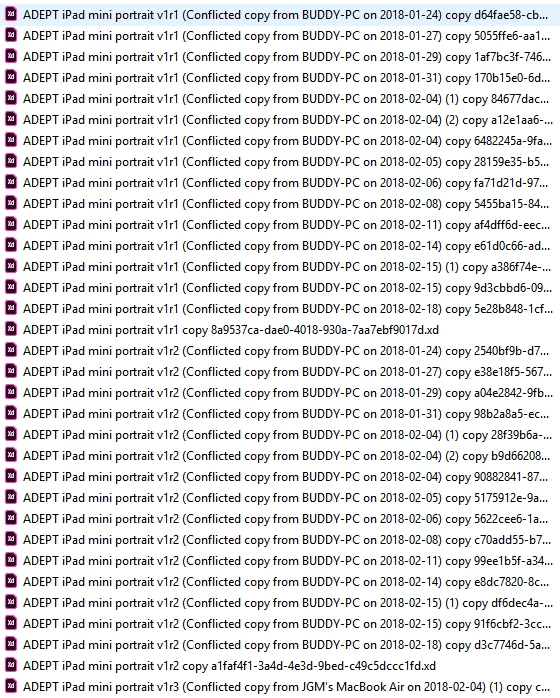
Conflicted copies with XD project within the Creative Cloud files folder

  • February 27, 2018
  • 3 replies
  • 2379 views

I should only have 5 or 6 files in CC folder. Instead I have 99. I just deleted all of these less than a week ago. HELP--I'm drowing!!!!

This topic has been closed for replies.
Correct answer David__B

Hi Michael,

Sorry to hear about your difficulties. A few questions to better understand

  • Why are you attempting to sync the XD project? I want to understand your workflow a little better
  • Is the XD project open on more than one computer when the issue is occurring?
  • Could you help us out by collecting log files from all of computers in which the issue is occurring?

To collect the log files download the log collection tool from here:

https://helpx.adobe.com/creative-cloud/kb/cc-log-collector.html

After you run it, it will create a .zip file on your desktop of all of the log files from your system. If you could upload and share a link with me on where to download the .zip from, I'll pass it on to our engineering dept. to review. You can send the link privately by clicking on my name here in the forums and select the message option.

Thanks,

- Dave

3 replies

Participant
June 20, 2019

Hi David

I have face similar kind of issue. I was working on one file with the previous version of XD and I have made changes with that file and saved it to CC. Then I updated my XD and when I opened that file my new changes was disapper and it was showing older file. I have downloaded that CC log collector and uploaded ZXP file to adobe server with name of "AdobeLogs_20190620_113848_639-win". I have made very crucial changes to those file. can you please help me with find those changes from it. I would appriciate it.

Thanks & Regards

Chirag Sankhat

ahazel82
Participating Frequently
July 2, 2018

I am having this issue too....Not this bad....I only have one conflicted copy. But it's annoying....How do I resolve file conflicts?

curtisch
Participant
September 20, 2018

I am having this problem with a team. It has caused the team to stop using the desktop synch. There are hundreds of conflicted copies, if not thousands.

curtisch
Participant
September 20, 2018

In my case the conflicted copies are illustrator files, and other image files.

David__B
David__BCorrect answer
Legend
February 28, 2018

Hi Michael,

Sorry to hear about your difficulties. A few questions to better understand

  • Why are you attempting to sync the XD project? I want to understand your workflow a little better
  • Is the XD project open on more than one computer when the issue is occurring?
  • Could you help us out by collecting log files from all of computers in which the issue is occurring?

To collect the log files download the log collection tool from here:

https://helpx.adobe.com/creative-cloud/kb/cc-log-collector.html

After you run it, it will create a .zip file on your desktop of all of the log files from your system. If you could upload and share a link with me on where to download the .zip from, I'll pass it on to our engineering dept. to review. You can send the link privately by clicking on my name here in the forums and select the message option.

Thanks,

- Dave