


Participant
Nov 10, 2015 1:16 PM UTC
Question

Core Sync Helper is causing Finder to overload CPU 300% on Mac OS X El Capitan

Since i upgraded to El Capitan i have very big issues using Creative Cloud! Now i even formatted and installed a fresh OS X El Capitan and still i have this problem!

Core Sync Helper is causing Finder to go up to 200% CPU and goes up to 100% CPU itself!

Im using a Macbook Pro 15" Retina and the fan's are blowing full power all the time! The fan's seem to get broken by this overload-usage and produce an annoying beep-sound by now which sounds "unhealthy" already.

Here is a screenshot from my fresh El Capitan installation:
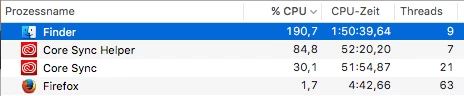
When I close Creative Cloud the problem persists. So I have to terminate Core Sync Helper manually by using the Activity Monitor.

I hope to see this fixed very soon. As I can't sync my files as long as Creative Cloud is turned off. But also I cannot let my Macbook work on 300% CPU any longer.

This topic is closed to new replies. Start a new post to keep the conversation going.

7 replies

Participant
Feb 2, 2021 6:31 PM UTC

Glad to know it's not just me; would be more glad if they'd just fix the thing already. Six years later and still persisting on latestest OS and nearly latest hardware.

Translate
Participant
Feb 1, 2021 1:13 PM UTC

I have the same issue with my macbook air. Would love to hear some thoughts on this... 🙂

Translate
dellm62592964
Participant
Sep 23, 2016 7:36 PM UTC

Hey bsbeamer,

Did you find anything?

Thanks.

Translate
Inspiring
Dec 29, 2015 8:23 PM UTC

In addition to CoreSyncHelper, I have been seeing increased activity from AdobeGCClient chewing resources.  I make sure to start the CC app on a weekly basis and am a legit, paying customer.  Why is this stuff killing my machines?  I do not want ANY of it running!  Seriously considering using something like Little Snitch 3 to help address this phoning home problem.

Translate
Inspiring
Dec 21, 2015 4:21 PM UTC

I simply would like to not have ANY Adobe products starting up with my machines.  When I want to use them, I will launch them myself.  I have disabled startup with every single Adobe application that I can find in both the user and system library folders StartupItems, LaunchAgents, and LaunchDaemons.

"Core Sync Helper" is the only one remaining that I cannot disable at this time.  It's acting like spyware/bloatware.

Translate
Participant
Nov 25, 2015 3:47 AM UTC

I have a same issue.

Translate
Participant
Dec 7, 2015 5:32 PM UTC

I have the same issue.  This is causing a total overload of not only the CPU usage but the battery drains very quickly.  This is going on even when there are no Adobe products open.  Can we please have an estimate of when this problem will be fixed? 

Translate