
Participant
March 31, 2014
Question

Core Sync kills LAN traffic on Mac

  • March 31, 2014
  • 2 replies
  • 651 views

Hi,

     why core sync process for 1 mac generates a lot of traffic, killing navigation on whole lan?

If I stop process, i get 27ms time response ping, if I restart process "Core Sync", time increase to 2200ms - 3000ms and the entire lan users come to me a bit angry.

Note that all files on my Creative Clouds folder are already syncronized, also fonts and Apps are updated.
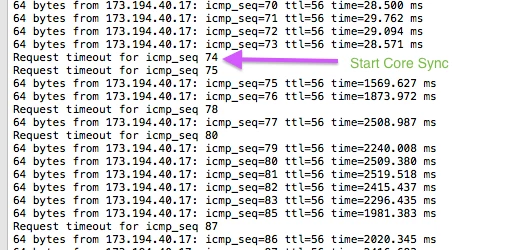
ps. working on iMac OSX 9.0.2, Adobe Creative Cloud 1.5.0.3.367.

thank you. Luca.

This topic has been closed for replies.

2 replies

Participating Frequently
April 2, 2014

Hi,

I've sent you a private message on next steps.  Essentially, if you can send us your log files, this should help is understand this behaviour.

Romsinha-9KMEUt
Adobe Employee
Adobe Employee
March 31, 2014

Moving to Creative Cloud download/install forum.

Regards,

Romit Sinha

Jeffrey_A_Wright
Legend
March 31, 2014

Moving this discussion to the File and Font Sync Early access forum.

Aculine I would recommend contacting our support team  For the best assistance, I recommend our chat support at http://adobe.ly/yxj0t6.  Our chat representatives can provide a personalized experience to resolve the issues you have described.

If you could also have your CoreSync logs available it would be beneficial.  They are located at ~/Library/Application Support/Adobe/CoreSync/CoreSync-yyyy-mm-dd.log. for Mac OS.

If you have Windows user experiencing the same difficulty then the CoreSync logs can be found at %USERPROFILE%\AppData\Roaming\Adobe\CoreSync\CoreSync-yyyy-MM-dd.log.