Known Participant
April 2, 2024
Answered

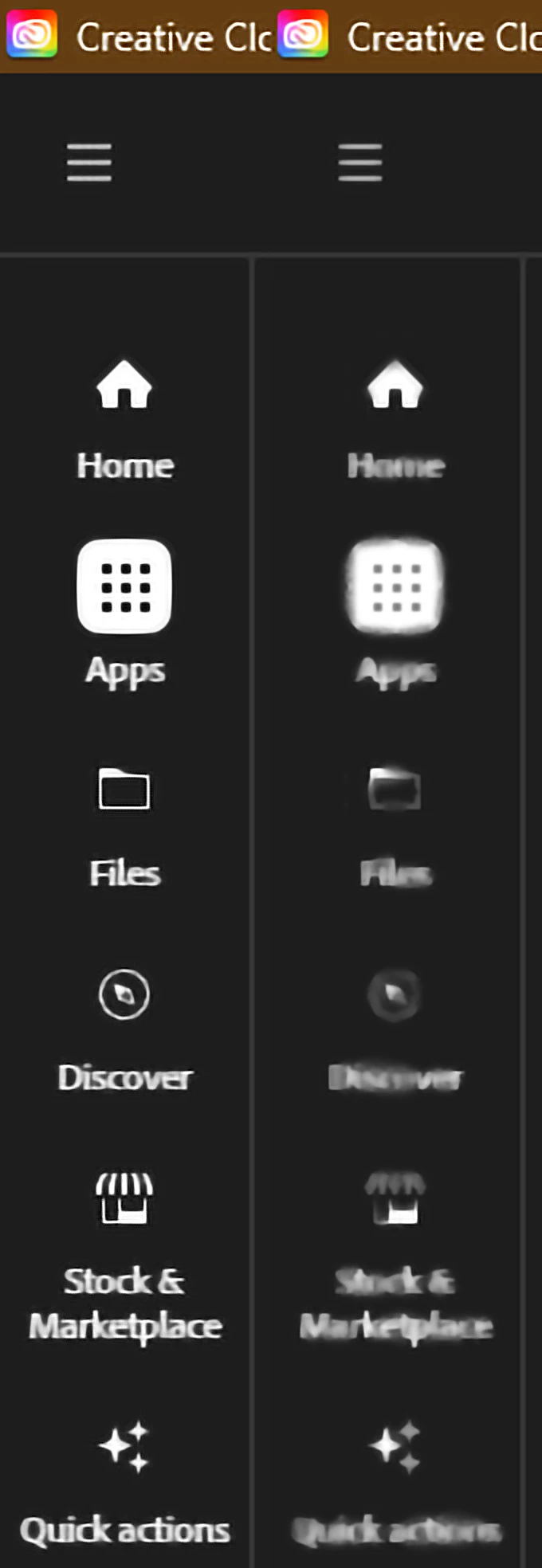
Creative Cloud app interface goes blurry the instant I move my mouse

  • April 2, 2024
  • 6 replies
  • 2735 views

The Adobe Creative Cloud App keeps going blurry the instant I move my mouse after opening up the app. The left image is what the app looks like the instant it opens and the right image shows what happens the in instant I move my mouse.


Attached is a Pastebin link with my full DXDiag information:

https://pastebin.com/xg7xRXeQ

.

Correct answer kglad

I tried that, but no dice.  As soon as I move the mouse the text and images go blurry again.  I don't think it's possible to fix this issue on my end.


if you did all that and the problem remains it confirms the problem's not the cc desktop app but something else on your computer.

6 replies

Participant
August 25, 2025

A mi tambien me pasa y aun no encuentro solucion, no es un problema aislado tengo windows y buenos componentes, buena red de internet, buenos  ajustes de resolucion, etc 

kglad
Community Expert
Community Expert
August 25, 2025

@synergia_4225 


make sure your video card driver is the studio (not gamer) version.

Christopher - DMM Studios
Participant
September 26, 2024

I'm having this problem on Windows 11, and it seems to correlate with/start when I try to run Adobe Acrobat, which says it can't run in Protected Mode. Trying to run without that mode (top option) leads to the Fatal Error.

This is a brand new install on a brand new Win 11 computer!

kglad
Community Expert
Community Expert
September 26, 2024

@Christopher - DMM Studios 


is this an acrobat only problem?

Participant
August 31, 2024

Hey, this is what I did to solve the problem. Go to your NVIDIA control pannel and turn on Image scaling. You can leave it on 50%, but if that doesn't work... Bump it up to 100%, I just fixed this for myself and am not sure if it is a permanent solution. Hope it helps.

Participant
August 31, 2024

Ignore what I said. I didn't fix it, but the first part of the fix I found in this Youtube seems to have done it for me. (fingers crossed) https://www.youtube.com/watch?v=auFVNmZ3d2Y

kglad
Community Expert
Community Expert
August 31, 2024

@Joek25121891bs98 


thank you.

Participant
August 27, 2024

Same thing happeneing on windows with no explanation

kglad
Community Expert
Community Expert
August 27, 2024

@David248417468sfs 


has this been a problem since the first install of the cc desktop app?

Participant
August 14, 2024

Same issue here. I found that resizing the app window temporarily fixes the blurriness, but not for long. No other app or program does this and I don't think it's done this before and I've had the CC since about the time it came out

Participant
August 14, 2024

I just noticed that when another window has focus, it clears up, again temporarily but longer.

kglad
Community Expert
Community Expert
April 2, 2024

does that happen with any other app?

Known Participant
April 2, 2024

No,  just the Adobe CC app.

kglad
Community Expert
Community Expert
April 2, 2024

i've never seen that reported so i suspect it's something unique to your computer.  however, if it is because of a cc desktop issue:


reset the cc desktop app by making sure it's in the foreground, then press:

Win: Ctrl + Alt + R
Mac: Cmd + Opt + R


if that fails, repair per https://helpx.adobe.com/download-install/kb/creative-cloud-install-stuck.html


if that fails and you have windows, open your control panel > add/remove programs > cc desktop app > repair

if that fails, uninstall using the correct uninstaller from https://helpx.adobe.com/creative-cloud/help/uninstall-creative-cloud-desktop-app.html#sa_src=web-messaging and then reinstall using*


if that fails, do a clean cc install carefully following each applicable step:

uninstall every cc app including preferences per https://helpx.adobe.com/creative-cloud/help/uninstall-remove-app.html

then uninstall the cc desktop app, again using the correct uninstaller per https://helpx.adobe.com/creative-cloud/help/uninstall-creative-cloud-desktop-app.html#sa_src=web-messaging

clean your computer of cc files per http://www.adobe.com/support/contact/cscleanertool.html

check for, and if available, update your os

if windows is your os, repair all ms visual c++ versions that can be repaired (use google if you don't know how to do this)

if windows is your os update your ms visual c++, if it can be updated (use google if you don't know how to do this)

restart your computer (don't skip this)

reinstall the cc desktop app using the "alternative download links" at the bottom of the page at https://helpx.adobe.com/download-install/kb/creative-cloud-desktop-app-download.html

use the desktop app to install your cc programs/trials