
zenbaby*
Participant
November 15, 2017
Question

Creative Cloud creating huge log files

  • November 15, 2017
  • 12 replies
  • 27125 views

So recently I noticed a huge slow down of my iMac, after using disk utility to look at storage I found my hard drive almost completely full, this was not right as I have less than 300gb of document files on here
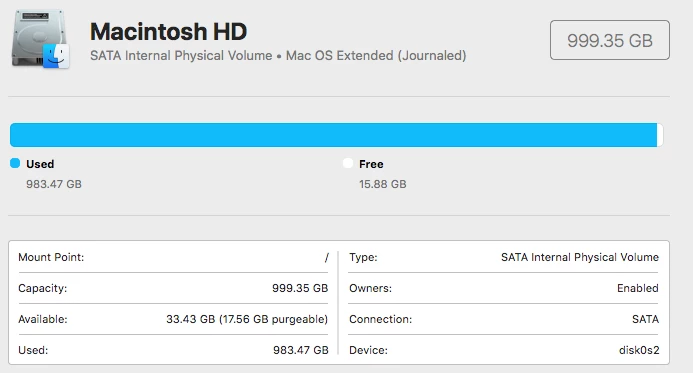
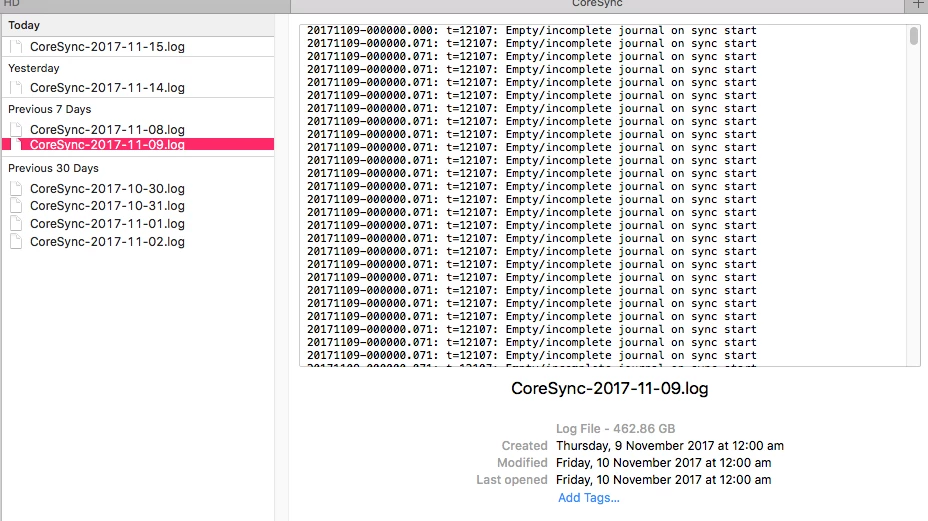
after 4 days of cleaning and restarting and basically going through all available options I downloaded a file program called Daisy Disk, which locates large files on the hard drive, and what I found astounded me completely. The creative cloud log files were huge the largest being over 460gb in size. I don't know what the hell happened to do this but I was happy to delete the log files and disable my creative cloud account, not only is the cloud close to useless as far as syncing issues and not being able to download folders (wtf is that about) but it completely ground my Mac to a standstill.

I hope this may be of use to someone else who may be having system usage issues and not be able to find the offending files.
[Here is the list of all Adobe forums... https://forums.adobe.com/welcome]

[Moved from Comments forum to the Creative Cloud forum... Mod]

This topic has been closed for replies.

12 replies

bldgr
Participating Frequently
May 30, 2018

I'm getting a log file that's 50 GB. I'm on Mac. I removed the files via CleanMyMac 3 and did the reinstall described above and it somwhat helped. The log file is now 1,56 GB but the CC doesn't stop syncing. For a brief moment it says "Files updated" or "Sync completed" (but in swedish) from the menu icon window, and then immediately after it says "Synchronizing" again and this goes on and on. It doesn't stop synchronizing. It did the exact same thing before I did the reinstall and when I got the 50GB file.

What is wrong? How to fix this?

Edit: Now, a couple of hours later it's still syncing, log file now 8,42 GB.

Name of log file: CoreSync-2018-05-30.log

Path: ~/Library/Logs/Creative Cloud/CoreSync/CoreSync-2018-05-30.log

bldgr
Participating Frequently
June 1, 2018

Update: Now i've had the sync on for the whole day and CC has been syncing (writing) todays log file the entire day. Log file is titled CoreSync-2018-06-01.log, and it kept writing until my HDD went full, a 56 GB file.

As stated earlier, reinstalling CC does not help me with this problem.

This needs to be fixed.

Adobe Employee
June 4, 2018

Hi,

Thanks for reporting the issue.

Would you be able to collect and upload log files from your system?

Please follow the steps mentioned below :

1. Shut down the Creative Cloud App

2. Open Activity Monitor and make sure that Core Sync process is not running in background

3. Delete Core Sync logs from path "~/Library/Logs/Creative Cloud/CoreSync/"

4. Start Creative Cloud App again

5. Wait till log file size increases to approx. 100 MB

6. Here is a link to an article about the tool with a link to download it. Log Collector Tool

     The tool will create a zip file on the desktop of all the log files.

Please could you send us your logs (punaggar@adobe.com) using the tool.

Thanks,

Puneet Aggarwal

David__B
Adobe Employee
Adobe Employee
November 15, 2017

Hi Zenbaby*,

I have seen this issue in the past but not recently. Could you try the following and see if it helps.

  • Delete all of the oversized log files
  • Uninstall  and reinstall the Creative Cloud app - this article contains a link to a tool which can be used to uninstall and reinstall the app: Uninstall the Adobe Creative Cloud desktop application
  • Please monitor the folder which contained the oversized log files and see if the issue reoccurs. If it does, we may need to collect log files from the system and work with our engineering department to see if we can determine the cause. It may be related to the Creative Cloud be unable to install correctly and be related to some kind of permissions issue.

If the oversized logs reoccurs please reply back to the thread and we can investigate further.

Thanks,

- Dave

Participant
November 26, 2017

Just as an FYI, I am also having this exact same problem, Except, unlike Zenbaby, I am on a PC.  I will follow the same steps you gave Zenbaby, but I wanted to let you know that this does not seem to be an Apple only problem.

Is there anyway that I can change the location where the log files are stored?  The are currently being stored on my C drive, which I try to keep clean for operating files.  I have a secondary drive that is huge where I would like to move the logs.

Lastly, and not related to the main subject, but following up on Zenbaby's comment:  Why is downloading limited to only files, and not whole folders?  I find this horribly inconvenient when I am working on my laptop when out of the office and need a variety of files/folders that I created on my PC.

Michael Lechasseur PSAC
Participant
November 29, 2017

Had to delete Creative Cloud on a PC after installing Photoshop Elements 18 due to a 170GB log file. Seriously!?