
Participant
December 23, 2021
Question

Creative Cloud fails loading after installing on windows 11

  • December 23, 2021
  • 3 replies
  • 6007 views

After installing succesfully on windows 11, Creative Cloud launches but remains stuck in the loading. After a while a blue message appears saying it's taking longer than usual. It advises to restart the computer and relaunch the app (but the same happens if I do). If I wait longer, I get this message.
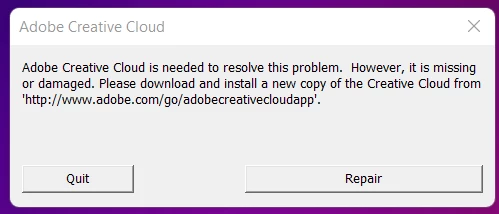
If I chose repair, I have the same problem. If I go to the address mentioned in the error message, the page is non existing. If I uninstall the app through adobe's uninstaller, dowload a new copy, restart and install again, I have the same problem.

I have a Dell Precision 5760 with the last firmare and Windows versions available.

Please help me solve this problem as soon as possible, as I need to work. Thank you so much!

This topic has been closed for replies.

3 replies

Participant
May 30, 2022

Pretty old post, but maybe there is already a CC update for windows 11 to avoid this bug?

Participating Frequently
March 28, 2022

I had a very similar issue with a brand new Dell XPS 8940 with Win11, right out of the box.    After a few hours of troubleshooting, I ended up reinstalling MS c++ 2015-19 redistributable.  That seemed to do the trick. 


https://docs.microsoft.com/en-us/cpp/windows/latest-supported-vc-redist?view=msvc-170


Good Luck, Walt

Participant
April 1, 2022

OMG! Thank you guys so much for being way smarter than I! I just got a new laptop as well and wes pretty worried for a hot second! lol

Jeffrey_A_Wright
Community Manager
Community Manager
December 23, 2021

Leonie, please see https://helpx.adobe.com/creative-cloud/kb/creative-cloud-missing-damaged.html for several solutions to resolve the error in your message.  If you download and run the CC Cleaner Tool, then make sure to rename the correct OOBE folder.

Participant
December 23, 2021

Hello, thank you for your reply, I followed the steps described but I end up with the same problem and error message.

Jeffrey_A_Wright
Community Manager
Community Manager
December 23, 2021

I am sorry to hear that, Leonie.  For your next steps, please download and run the CC Log Collector Tool from http://helpx.adobe.com/creative-cloud/kb/cc-log-collector.html.  Once the log files have been uploaded, you can begin a secure chat session at https://helpx.adobe.com/contact.html?rghtup=autoOpen so the logs can be interpreted any errors corrected.