bkish
Participant
Jun 12, 2015 1:03 PM UTC
Question

Creative Cloud Files Not Syncing After Desktop App Update

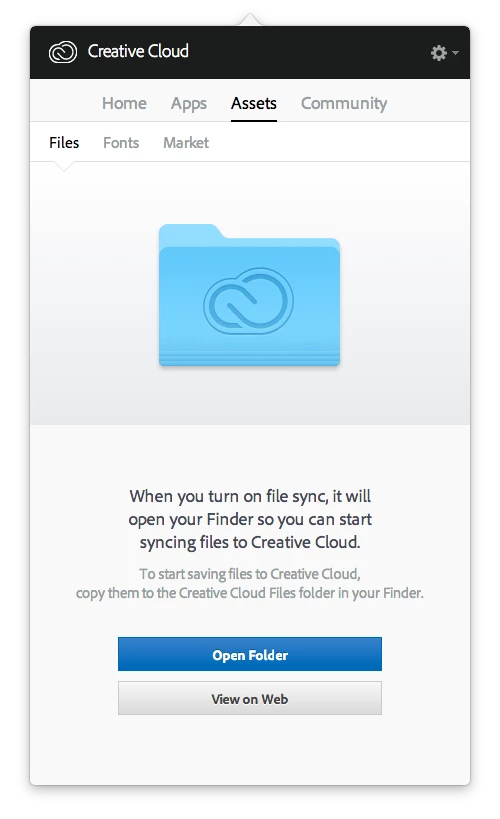
After updating the Creative Cloud Desktop app this morning to 2.1.0.108, my files will no longer sync. File syncing is turned on, but nothing works. Help! Here'a  screenshot below:
This topic is closed to new replies. Start a new post to keep the conversation going.

11 replies

Participating Frequently
Jun 15, 2015 12:52 AM UTC

Hello all,

To add to what David mentioned. Please run the Creative Cloud desktop app uninstaller available at https://helpx.adobe.com/creative-cloud/help/uninstall-creative-cloud-desktop-app.html.  Then download the updated Creative Cloud desktop app here and install. https://creative.adobe.com/products/creative-cloud

Let us know if you are still having issues

Regards

Scot

Translate
Participant
Jun 14, 2015 7:29 AM UTC

Hi, have you resolved this issue yet? Same problem here. Thanks, Mark.

Translate
David__B
Legend
Jun 14, 2015 10:12 PM UTC

Hi Mark,

Please try to solution here: https://helpx.adobe.com/x-productkb/global/creative-cloud-crash-core-sync.html

Thanks,

- Dave

Translate
Participating Frequently
Jun 13, 2015 11:45 PM UTC

HI Brad,

Our engineering team would like to look deeper into this issue. Could you collect the log files for this issue for us to review? Then once you have the logs files. Can you upload the files in a single zip file to your Creative Cloud account and share the link with us here?  Here is a link to show how to upload your files and share them. Creative Cloud Help | Share files and folders  & Online file storage and sharing | Creative Cloud Assets

They log files are located at;

Mac:

The log file can be found here:

<Mac Hard Drive>/Users/<username>/Library/Application Support/Adobe/CloudSync/CoreSync-YYYY-MM-DD.log

(where YYYY-MM-DD indicate the date of the last log)

Note: The Users Library user folder is hidden on starting with 10.7 or later

see http://helpx.adobe.com/x-productkb/global/access-hidden-user-library-f iles.html

Windows:

The log file can be found here:

C:\Users\<username>\AppData\Roaming\CloudSync\CoreSync-YYYY-MM-DD.log

(where YYYY-MM-DD indicate the date of the last log)

Note: The AppData folder is hidden by default this doc shows how to show it if needed

http://helpx.adobe.com/x-productkb/global/show-hidden-files-folders-extensions.html

Your help is appreciated.

Regards

Scott

Translate
Participant
Jun 14, 2015 6:11 AM UTC

Not to sound whiney, but I had to use the work-around to fix the issue on my computer too.  I have troubles of some sort with the CC update about every other time and it's frustrating.  I know it is for you too, I'm just saying, I really wish there was better quality control before pushing something out to everyone automatically that will break their sync.  I hope the atmosphere at Adobe hasn't shifted to low quality/frequent updates now that we're being billed each month no matter what.  As consumers, we've lost our ability to "vote with our billfold" with the new CC accounts.

Translate
bkish
bkishAuthor
Participant
Jun 12, 2015 3:12 PM UTC

That worked! Thanks!

Translate
Sheena Kaul
Legend
Jun 12, 2015 3:14 PM UTC

You are welcome!

P.S. when using the adobe forums, please mark helpful/correct responses of Staff or helper, if there are any.  

Translate
Fearless_friends157F
Participating Frequently
Jun 12, 2015 3:00 PM UTC

I am having the same issue after I updated to version 2.1.0.108.

Translate
Sheena Kaul
Legend
Jun 12, 2015 2:26 PM UTC
Sheena Kaul
Legend
Jun 12, 2015 1:06 PM UTC

Hi Brad,

Can you please confirm me the version of Adobe Creative Cloud desktop app currently installed?

Regards,

Sheena

Translate
