
Participant
May 1, 2019
Answered

Creative Cloud libraries missing icons

  • May 1, 2019
  • 3 replies
  • 1528 views

Hi all,

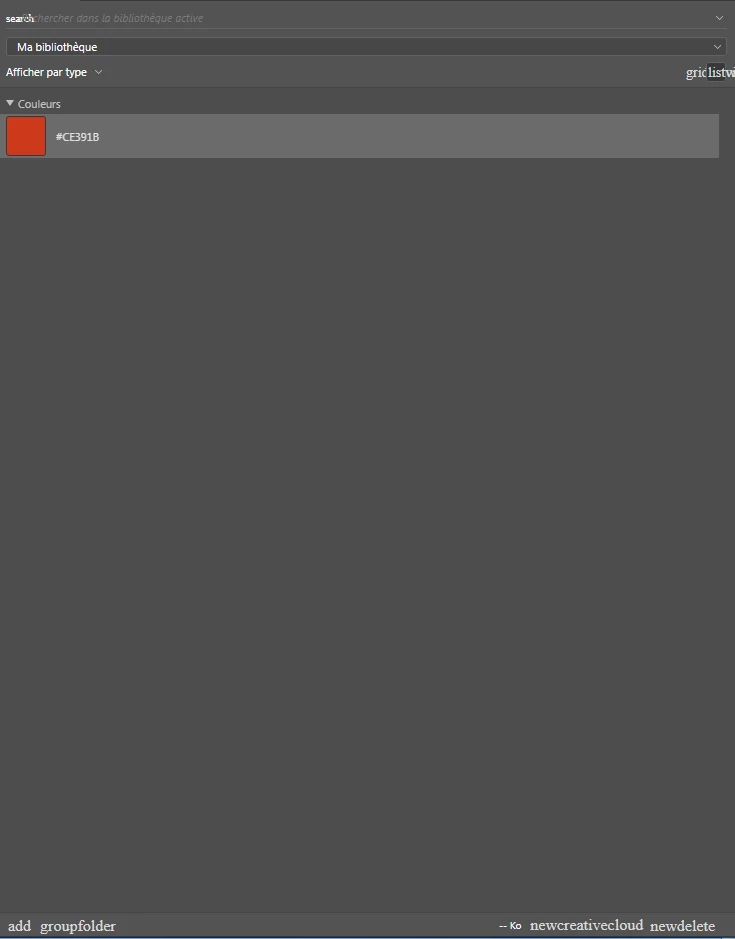
I have a small problem with my CC libraries, they are working and syncing but it doesn't appear quite right as you can see..

I tried the Creative Cloud Cleaner, fixed the host file, logged out and in and it doesn't change anything across all Adobe software

Can you help me fix this little graphic issue?

Thanks a lot!
This topic has been closed for replies.
Correct answer user4725390

This issue was resolved by doing:

1. Navigate to extensions folder (mac: Macintosh HD⁩ ▸ ⁨Library⁩ ▸ ⁨Application Support⁩ ▸ ⁨Adobe⁩ ▸ ⁨CEP; win: C:\Program Files (x86)\Common Files\Adobe\CEP\extensions)⁩ and delete all folders which start with "CC_LIBRARIES_PANEL..."
2. Now follow steps of Solution 2 in this article: https://helpx.adobe.com/creative-cloud/kb/libraries-panel-not-working.html

Please, make sure you killed CCLibraries process in Task Manager, / Activity Monitor as well as you have quit all Adobe related products (I usually quit them manually, then double checking from Activity Monitor, that there is no tasks still running). This is mentioned in steps 1 and 2 of the article, but wanted to point out, because it is important. 

This way we will reinstall Libraries and problem will be gone.

Please, feel free to contact me with questions.

Thank you,
Mariia

3 replies

user4725390
Adobe Employee
user4725390Correct answer
Adobe Employee
May 6, 2019

This issue was resolved by doing:

1. Navigate to extensions folder (mac: Macintosh HD⁩ ▸ ⁨Library⁩ ▸ ⁨Application Support⁩ ▸ ⁨Adobe⁩ ▸ ⁨CEP; win: C:\Program Files (x86)\Common Files\Adobe\CEP\extensions)⁩ and delete all folders which start with "CC_LIBRARIES_PANEL..."
2. Now follow steps of Solution 2 in this article: https://helpx.adobe.com/creative-cloud/kb/libraries-panel-not-working.html

Please, make sure you killed CCLibraries process in Task Manager, / Activity Monitor as well as you have quit all Adobe related products (I usually quit them manually, then double checking from Activity Monitor, that there is no tasks still running). This is mentioned in steps 1 and 2 of the article, but wanted to point out, because it is important. 

This way we will reinstall Libraries and problem will be gone.

Please, feel free to contact me with questions.

Thank you,
Mariia

user4725390
Adobe Employee
Adobe Employee
May 3, 2019

Please check your private messages. Thanks!

kglad
Community Expert
Community Expert
May 1, 2019