
Participant
March 17, 2016
Answered

Creative Cloud moved almost 5,000 cloud files to the trash automatically.

  • March 17, 2016
  • 1 reply
  • 1360 views

Creative Cloud moved almost 5,000 cloud files to the trash automatically. I walk away from my desk for about 20 minutes, come back, and see that 4,888+ files have been moved to the trash in my mac notifications. There's no way that I could've selected that many files individually to throw away, so what gives? How could it automatically do that? How can I fix it? I surely don't have time to hand place that many files back into their folders.
This topic has been closed for replies.
Correct answer Ken G. Rice

To understand why it happened please send the Core Sync logs to the Core Sync team.

Use the Adobe Log Collector Tool at https://helpx.adobe.com/creative-cloud/kb/cc-log-collector.html and directly email the logs plus explanation of the problem to SyncForum-Communication@adobe.com. Please provide the additional information outlined by Warner Harress in this Adobe forum post at https://forums.adobe.com/message/8385752#8385752.

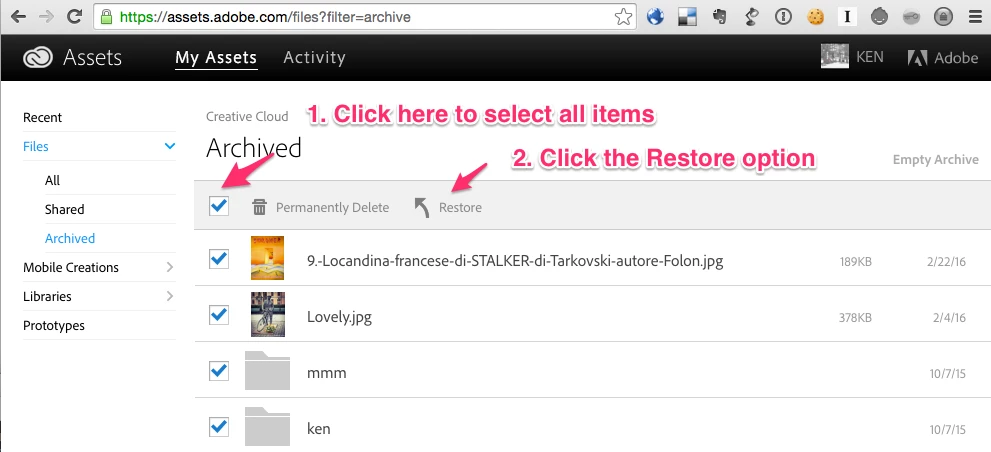
To recover the files to their original location please use the Restore option from the Archive at https://assets.adobe.com/files?filter=archive.

1 reply

Bani Verma
Legend
March 17, 2016
RonBrowerAuthor
Participant
March 17, 2016

A move but no answer?

How could the software do that by itself?

Ken G. Rice
Community Manager
Ken G. RiceCommunity ManagerCorrect answer
Community Manager
March 18, 2016

To understand why it happened please send the Core Sync logs to the Core Sync team.

Use the Adobe Log Collector Tool at https://helpx.adobe.com/creative-cloud/kb/cc-log-collector.html and directly email the logs plus explanation of the problem to SyncForum-Communication@adobe.com. Please provide the additional information outlined by Warner Harress in this Adobe forum post at https://forums.adobe.com/message/8385752#8385752.

To recover the files to their original location please use the Restore option from the Archive at https://assets.adobe.com/files?filter=archive.