JR Boulay
Community Expert
Community Expert
December 5, 2020
Answered

Creative Cloud ne synchronise pas

  • December 5, 2020
  • 6 replies
  • 800 views

Bonjour


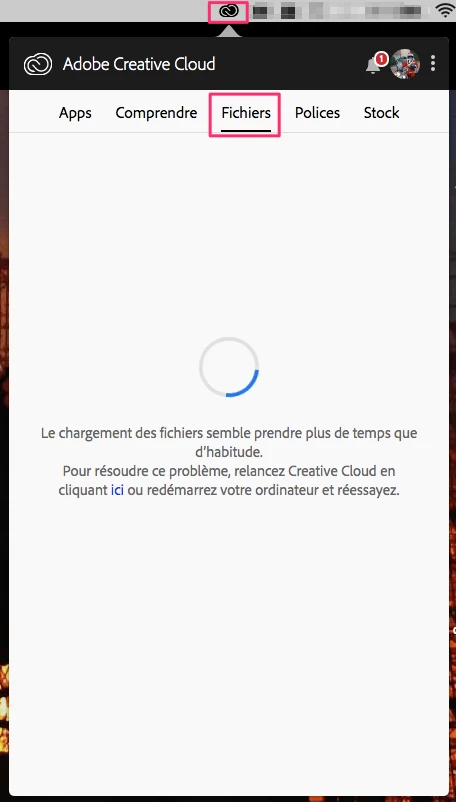
Depuis plusieurs semaines mon vieux Mac ne se synchronise plus avec mon PC ni avec mes autres appareils, pourtant Creative Cloud est bien connecté avec mon Adobe ID.

Je vois toujours cette roue qui tourne continuellement, j'ai relancé Creative Cloud et redémarré l'ordinateur (plusieurs fois) comme indiqué mais ça n'y change rien.

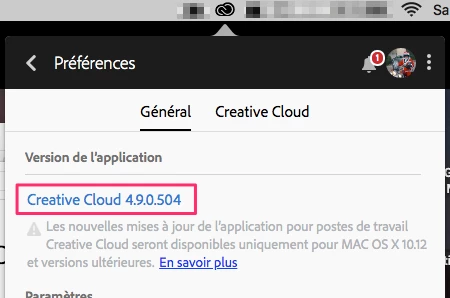
Et il n'y a pas de mise à jour disponible, ni pour Creative Cloud ni pour MacOS.


Merci de votre aide.


This topic has been closed for replies.
Correct answer kglad

ftry resetting the cc app: To reset the Creative Cloud desktop app, make sure it's in the foreground, then press:

Win: Ctrl + Alt + R
Mac: Cmd + Opt + R

if that fails, try to repair
https://helpx.adobe.com/download-install/kb/creative-cloud-install-stuck.html

if that fails go ahead and uninstall/reinstall per the above link

if that fails, do a clean cc install following each applicable step:

uninstall every cc app including preferences, https://helpx.adobe.com/creative-cloud/help/uninstall-remove-app.html
then uninstall the cc desktop app, https://helpx.adobe.com/creative-cloud/help/uninstall-creative-cloud-desktop-app.html
clean your computer of cc files per http://www.adobe.com/support/contact/cscleanertool.html
check for, and if available, update your os
restart your computer (don't skip this)
reinstall the cc desktop app, https://creative.adobe.com/products/creative-cloud.
if you're unable to install the cc desktop app at this stage, use an administrator account (solution 4 here, https://helpx.adobe.com/creative-cloud/kb/creative-cloud-missing-damaged.html)
use the desktop app to install your cc programs/trials

6 replies

JR Boulay
Community Expert
JR BoulayCommunity ExpertAuthor
Community Expert
March 17, 2021

Seul Adobe vend des logiciels Adobe et les polices sont des logiciels (presque) comme les autres.

Sur des sites "tiers" on peut trouver des équivalents, parfois avec le même nom, mais ce ne sont pas exactement les mêmes.


Pour les acheter : https://fonts.adobe.com/

Acrobate du PDF, InDesigner et Photoshopographe
A. DELATTRE
Participant
March 17, 2021

Merci pour votre réponse.


Je vais regarder plus en détail sur le site.


Bonne soirée.

JR Boulay
Community Expert
JR BoulayCommunity ExpertAuthor
Community Expert
December 8, 2020

Thank you, but I'll stop wasting my time with issues that shouldn't exist. I will use the hard drive of my NetBox which is more than enough to communicate files between an old Mac and a brand new PC.

Acrobate du PDF, InDesigner et Photoshopographe
A. DELATTRE
Participant
March 16, 2021

Bonsoir.


Je rencontre le même probleme de synchronisation (même configuration de MAC OS) et j'aimerais savoir comment récupérez les polices disponibles sur adobe-fonts.

Un conseiller sur le chat m'à indiquer que les polices étaient téléchargeable sur des sites tiers sans plus d'explication. Vers quel(s) site(s) ce tourner et comment utiliser ces polices sachant quelles sont payantes ?


Merci pour votre aide.

JR Boulay
Community Expert
JR BoulayCommunity ExpertAuthor
Community Expert
December 7, 2020

After several uninstallations, cleanup and reinstallations I have made some progress. Instead of showing me wrong information now the sync panel is greyed out there is nothing I can do.

It has at least the merit of being clear: it does not work, or no more.

😞


Acrobate du PDF, InDesigner et Photoshopographe
kglad
Community Expert
Community Expert
December 8, 2020

you're probably going to be told to update but using a browser that allows popups and cookies, contact adobe support during pst business hours by clicking here, https://helpx.adobe.com/contact.html

click contact us (in the lower right)
in the chat field, type AGENT
be patient, it can take quite a while to reach a human

JR Boulay
Community Expert
JR BoulayCommunity ExpertAuthor
Community Expert
December 5, 2020

Thank you, I will try that and let you know.

Acrobate du PDF, InDesigner et Photoshopographe
kglad
Community Expert
Community Expert
December 5, 2020

good luck!


everything's safe until you get to the uninstall part.  that's when your risk of not being able to reinstall comes into play.

JR Boulay
Community Expert
JR BoulayCommunity ExpertAuthor
Community Expert
December 5, 2020

Yes, I like the risks

Acrobate du PDF, InDesigner et Photoshopographe
kglad
Community Expert
kgladCommunity ExpertCorrect answer
Community Expert
December 5, 2020

ftry resetting the cc app: To reset the Creative Cloud desktop app, make sure it's in the foreground, then press:

Win: Ctrl + Alt + R
Mac: Cmd + Opt + R

if that fails, try to repair
https://helpx.adobe.com/download-install/kb/creative-cloud-install-stuck.html

if that fails go ahead and uninstall/reinstall per the above link

if that fails, do a clean cc install following each applicable step:

uninstall every cc app including preferences, https://helpx.adobe.com/creative-cloud/help/uninstall-remove-app.html
then uninstall the cc desktop app, https://helpx.adobe.com/creative-cloud/help/uninstall-creative-cloud-desktop-app.html
clean your computer of cc files per http://www.adobe.com/support/contact/cscleanertool.html
check for, and if available, update your os
restart your computer (don't skip this)
reinstall the cc desktop app, https://creative.adobe.com/products/creative-cloud.
if you're unable to install the cc desktop app at this stage, use an administrator account (solution 4 here, https://helpx.adobe.com/creative-cloud/kb/creative-cloud-missing-damaged.html)
use the desktop app to install your cc programs/trials

kglad
Community Expert
Community Expert
December 5, 2020

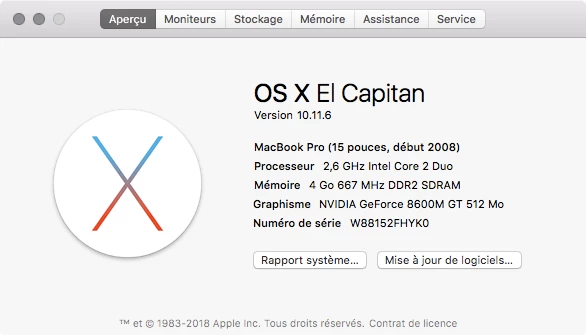
your mac is so old it doesn't support anything but an old (5 major updates) mac os and you mac os does not support the current version of creative cloud. so, you're using a out-of-date os and out-of-date cc app.  (btw, you must not have any current adobe apps either because of your mac os.)


attempting to fix the sync problem is going to risk losing the ability to use those out-of-date adobe apps which you're apparently ok using.  do you want to risk that?