
Participating Frequently
February 23, 2023
Answered

Creative cloud quota anomaly?

  • February 23, 2023
  • 2 replies
  • 4013 views

Hi there,

I only use CC storage when I am traveling, emptying my cards on my iPad and uploading the pictures to the cloud whenever possible. Then back home I open LRC and everything downloads locally.

As I write this message both LRC, iOS apps and LR Cloud show my usage as 5.2 Mo / 20 Go, but Creative Cloud app or assets.adobe.com indicate that I use 5.5 Go. No unit error here, 5.5 Mo Vs 5.5 Go.
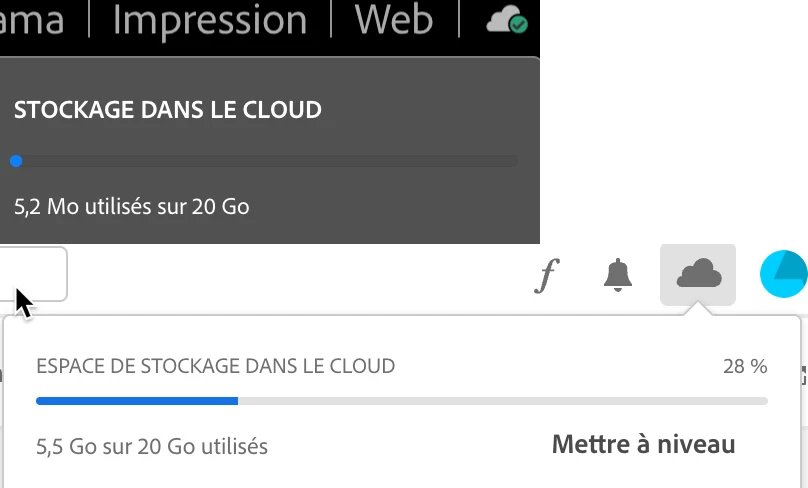
In assets I try to identify the files that take this space and the only ones that appear are the ones that are synchronized with my local folder, for a total usage of 5.2 Mo. No library, nothing in deleted files.

Any idea what the problem may be?

This topic has been closed for replies.
Correct answer Neelamk

Hi Stan,


Thank you for the information. We are sorry for the delay. I have forwarded the details to the dedicated team, they are working on it. I will keep you posted with the latest updates.


I appreciate your patience.


Regards,

Neelam


@stanislavb98449803 Hi Stan, 


We got an update from the Engineering team that everything is good and it is advised that you should check the deleted folder on asset web (assets.adobe.com) and delete files permanently if not needed. Please refer to the article link for the same:

https://helpx.adobe.com/creative-cloud/help/delete-files-permanently.html


For detailed storage capacity, I will share you through Private message.


I hope this helps. Please let us know if you need more details.


Regards,

Neelam

2 replies

Known Participant
March 14, 2023

Hi, I have a similar problem. Over the weekend, I added a larger folder (approx. 270GB - 30 thousand files) with a lot of files to my CC files folder, after renaming a few files that contained illegal characters it seemed that everything was uploaded to the cloud - I have a green light for everything. However, my storage still shows very little usage (I understand it takes a while, but it always updated within a few minutes). Currently, according to the system, the CC files folder takes up 377GB, but the application, on the website, simply shows me the usage of only 287GB. Another anomaly is that in the web interface I have some folders duplicated several times in the newly added folder. So I'm worried about my data. The total number of files is not even 120 thousand, so I'm still within the quota. I am currently running macOS 12.6.3 with CC version 5.10.0.573. Newly added files are syncronized, or so it seems 🙂

kglad
Community Expert
Community Expert
March 14, 2023

@stanislavb98449803 


to check your cc files, go to your cc web site by opening cc desktop app>clicking cloud icon>cc web empty check all 8 folders (4 in your files, 2 in shared with you, 1 in shared with you, 1 in deleted). 

Known Participant
March 14, 2023

Sorry I don't quite get it, if I delete files on the site, the files in my synced folder on disk are also deleted immediately - which is not desirable. I can pause the sync, which I do very often due to internet load or faster work, browsing folders with sync off is faster. I can of course delete all the files and then restore them from a backup and have them all uploaded to the site again - but that takes quite a bit of time and I can only play with it on the weekends.

Neelamk
Legend
February 23, 2023

Hi Frederic,


Thank you for writing to us. We are sorry for your difficulties as you are unable to view the correct storage capacity. To get more details on the storage capacity could you please check the below article link to see if the storage data is correct :

https://helpx.adobe.com/creative-cloud/kb/file-storage-quota.html


Please let me know if this helps. Also please share the OS version of your PC and the Creative Cloud Desktop Application version installed on your PC.


We hope to hear from you soon.


Regards,

Neelam

FredericCAuthor
Participating Frequently
February 23, 2023

Hi Neelam,

I'm on a Mac running Monterey 12.6.3, CC app 5.9.0.373.

I checked the link you provided, the anomaly appears on the web services exactly as on my local apps:

I can provide you with screenshots of the various assets tabs but with the exception of two synchronized files that account for the 5,2 Mo, everything is empty including the trash bin.

I did have a few Adobe express projects, untouched for more than a year, so I would be surprised if they would be responsible for this 5.5 Go usage that appeared recently but I deleted them anyway.


Neelamk
Legend
February 23, 2023

Hi There,


Thank you for the information and I understand your concern. Could you please check if you have any updates pending for the Creative Cloud Desktop application? Please refer below for steps to update the application:

Update your Creative Cloud apps manually

If you don't want to automatically update your apps, you can update them manually with the help of the Creative Cloud desktop app.

  • Open the Creative Cloud desktop app. (Select the   icon in the Windows taskbar or the macOS menu bar.)

In the Updates screen, select Update to update the app you want.

Your app is updated.


Please let me know if this helps, also once it is done and did not help after you sign out and sign in back. You could try to uninstall and reinstall through the below article link:

https://helpx.adobe.com/creative-cloud/help/uninstall-creative-cloud-desktop-app.html


Once all the steps are done, please let me know if this helps you. 


We hope to hear from you soon.


Regards,

Neelam