
Known Participant
May 19, 2023
Question

Creative Cloud - Reparatur

  • May 19, 2023
  • 2 replies
  • 294 views

Bereits zum 2. Mal  bekomme ich die folgende Nachricht, zuletzt nach Export zwei umfangreicher "Sammlungen" auf eine HDD: Zur Behebung dieses Problems ist Adobe Creative Cloud erforderlich. Diese fehlt jedoch oder ist beschädigt. Laden Sie eine neue Kopie herunter und installieren sie diese = > Reparatur.


Am nächsten Tag nach dem Herunterfahren von LR:


:
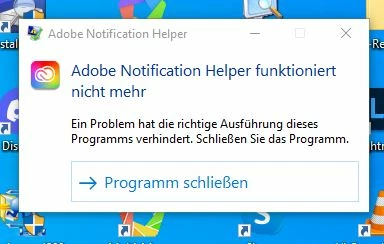
Diese Fehlermeldung habe ich schon öfter bekommen, ohne dass ich eine Fehlfunktion feststellte.


sfc /scanow findet keinen Fehler,,,

Im Netz wird geraten, den Notification Helper zu deaktivieren wg. der hohen Auslastung des CPU.

Den Adobe Acrobat benütze ich nicht mehr...

Kann sich jemand daraus einen Reim machen?

Liebe Grüße

Robert

Robert

This topic has been closed for replies.

2 replies

kglad
Community Expert
Community Expert
May 19, 2023

if @John T Smith's suggestion doesn't help, reset the cc desktop app by making sure it's in the foreground, then press:

Win: Ctrl + Alt + R
Mac: Cmd + Opt + R


if that fails, repair per https://helpx.adobe.com/download-install/kb/creative-cloud-install-stuck.html


if that fails, uninstall using the correct uninstaller from https://helpx.adobe.com/creative-cloud/help/uninstall-creative-cloud-desktop-app.html#sa_src=web-messaging and then reinstall using*


if that fails, do a clean cc install carefully following each applicable step:

uninstall every cc app including preferences per https://helpx.adobe.com/creative-cloud/help/uninstall-remove-app.html

then uninstall the cc desktop app, again using the correct uninstaller per https://helpx.adobe.com/creative-cloud/help/uninstall-creative-cloud-desktop-app.html#sa_src=web-messaging

clean your computer of cc files per http://www.adobe.com/support/contact/cscleanertool.html

check for, and if available, update your os

if windows is your os, repair all ms visual c++ versions that can be repaired (use google if you don't know how to do this)

if windows is your os update your ms visual c++, if it can be updated (use google if you don't know how to do this)

restart your computer (don't skip this)

reinstall the cc desktop app using the "alternative download links" at the bottom of the page at https://helpx.adobe.com/download-install/kb/creative-cloud-desktop-app-download.html

use the desktop app to install your cc programs/trials

NOTE: win 11 users that have trouble with the latest win 10 installer often have success with the older win 10 installer.

John T Smith
Community Expert
Community Expert
May 19, 2023