

gregg4gia
Known Participant
November 8, 2016
Answered

Creative Cloud repeatedly asks me to turn on file syncing

  • November 8, 2016
  • 1 reply
  • 987 views

I've read the November 8, 2016 announcement by David__B at the top of the File Hosting, Syncing, and Collaboration forum, which is titled:

Adobe is currently investigating reports of file sync related issues

I've downloaded the LogCollectorTool.app and run it, and now I have a zip file full of logs.

But Adobe wants me to turn on the very thing I don't want to turn on (CC file syncing) in order to send it to them, so I'm attaching it to this post instead. The link is below my signature.

I hope my logs reach the dev who want it and that it helps in solving the problem.

All best,

Gregg

https://www.dropbox.com/s/tw5j5hldj9wl3fd/AdobeLogs-08112016-0907-Greggs-iMac-2.local.zip?dl=0
This topic has been closed for replies.
Correct answer David__B

Thanks, Dave. I appreciate the speedy reply.

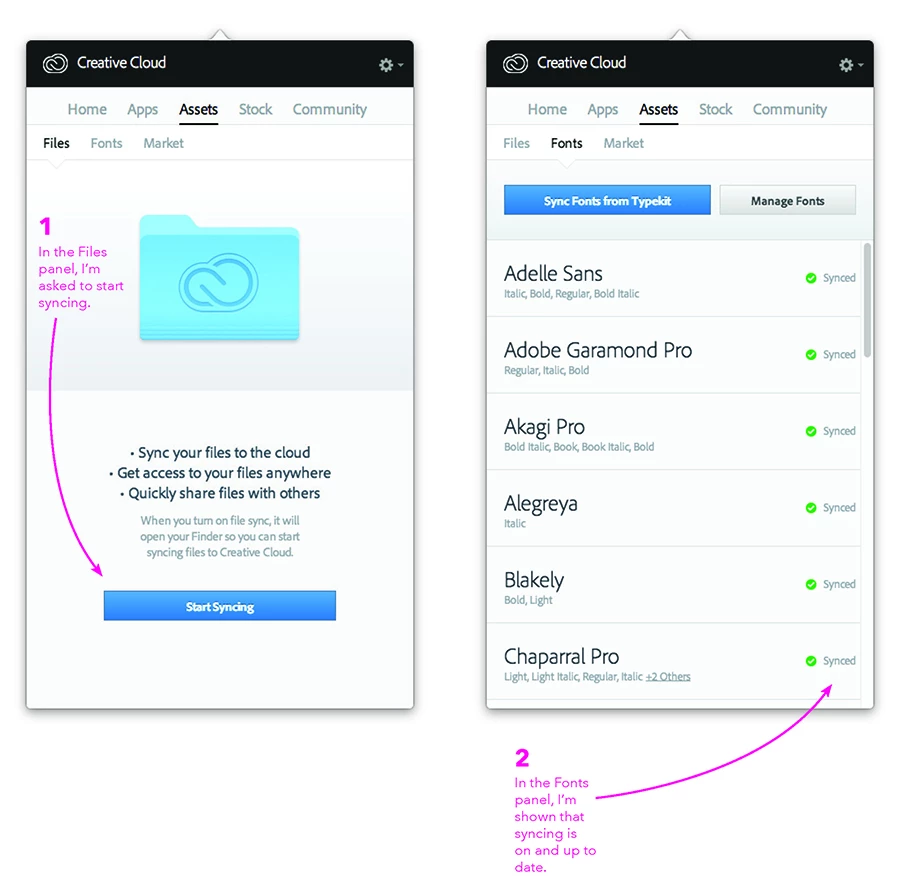
Just to clarify: I don't use CC libraries. I do use Typekit fonts, but aren't file syncing and font syncing two different things? They have separate tabs under Assets, and it looks like they aren't interdependent—at least, not in the UI. The attachment to this post illustrates this.

Also to clarify: I used file syncing only once, decided I didn't find it useful, and turned it off after removing my test files. That was months and months ago. The reason for my initial post above is that I began getting messages telling me to turn on file syncing. I got no messages about any file failing to sync or that file syncing in general had failed.

.


Hi Gregg,

File sync and Typekit are different but I was under the impression Typekit uses some of the syncing related processes to make fonts available in the products. I could be mistaken.

I'm not sure why you'd be getting these prompts. Could you take and share a screen shot of the prompt if it occurs again and I can investigate further?

Best,

- Dave

1 reply

David__B
Legend
November 18, 2016

Hi Gregg,

This issue should be resolved now. Are you still having sync issues?

Thanks,

- Dave

gregg4gia
gregg4giaAuthor
Known Participant
November 18, 2016

I'm at work now, and I just launched the Adobe Creative Cloud app for

the first time since my post. It hasn't asked me to turn on file syncing

yet, but it's only been five minutes since I opened the app. How long

should I watch for this before knowing that the issue is resolved?

Thanks for contacting me about this. I appreciate it.

Gregg

gregg4gia
gregg4giaAuthor
Known Participant
November 18, 2016

Why is my reply above marked "Correct Answer"? It's a question and comment that I don't know if the issue is resolved?

EDIT: I'm adding to the above to say that this reply is also marked "Correct Answer."

Perhaps the reason is buried in a forum FAQ, but it seems misleading at best. If I'm browsing forum threads I'm not following as I look for answers, I'd find this quite confusing.