
Participant
November 4, 2017
Question

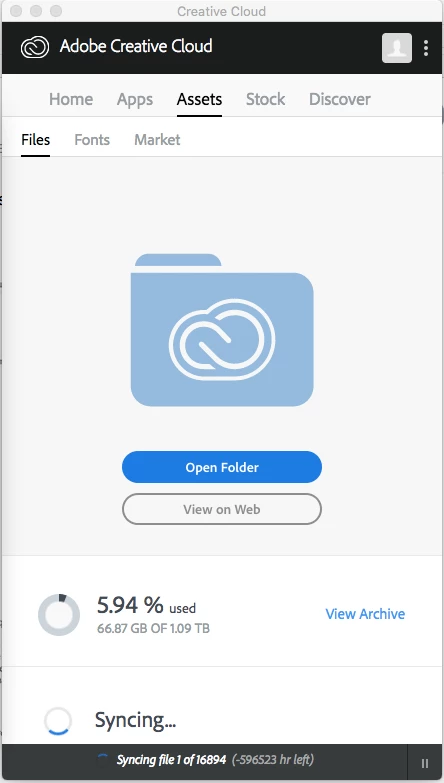
creative cloud syncing (showing strange times and using up cpu)

  • November 4, 2017
  • 2 replies
  • 282 views

recently i changed the location of my creative cloud folder to an external hard drive. I get varied times of syncing from over 20,000hrs to showing negative time also. It also using a lot of my CPU and my computers hard drive seems to get used up also. What is the problem?
This topic has been closed for replies.

2 replies

David__B
Adobe Employee
Adobe Employee
November 6, 2017

Hi David,

Sorry to hear about your difficulties. I had a few additional questions for you.

  • What version of the Creative Cloud app are you using?
  • What operating system and version are you using?
  • Could you share a screen shot showing the high CPU and hard drive use?
  • Did you change the sync folder location in the Creative Cloud app preferences? Use the Creative Cloud desktop app to manage your apps and services
  • Did you stop file sync when changing the folder location?

Please get back to me when you get the chance.

Thanks,

- Dave

Participant
November 13, 2017

Hello,

I figured it out. I just synced files ones by one.

With the new lr programs what is the best way to import photos. Thru Lightroom classic or the cloud bases one?

db

917.754.8603

David__B
Adobe Employee
Adobe Employee
November 13, 2017

Hi db,

Good to hear you got it sorted. For importing photos I'd suggest trying both yourself and see what makes the most sense for you. For LR CC Classic  you're working from physical files on the HD for LR CC you're uploading to the cloud. I'd suggest reading through this FAQ about the differences FAQ | Creative Cloud Photography plans

kglad
Community Expert
Community Expert
November 4, 2017