
RPerrella_Ph
Participant
January 27, 2020
Question

Creative Cloud syncronization 100% CPU is blocking File Explorer and the whole PC

  • January 27, 2020
  • 2 replies
  • 568 views

Creative Cloud files syncronization from PC to Cloud IS A NIGHTMARE !

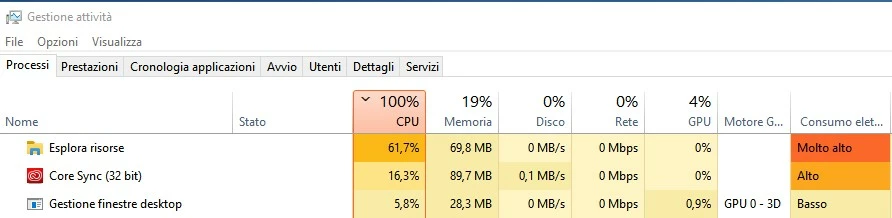
It causes a 100% CPU usage, that is blocking everything else in my PC. As you can see from the attached screenshot, File Explorer is heavely engaged.

This situation lasts even if I click in "PAUSE" syncronization in Creative Cloud App.

To solve it, I need to kill the Core Sync process in the process manager of Windows 10.

This is a shame, even that the App is 32 bit ... 

Please, update Creative Cloud Desktop App as soon as possible.

Best regards,

Roberto
 

This topic has been closed for replies.

2 replies

David__B
Adobe Employee
Adobe Employee
January 20, 2021

Thanks for posting Roberto and Tomas,


A couple of things I'd recommend trying in relation to this issue


Hope these help,

- Dave

Tomáš Rázga
Participating Frequently
January 20, 2021

Hi David
Thank you for your message.
I tried restarting the computer several times.
I have also reinstalled the complete windows 10 several times and I have all Windows updates.
I also now uninstalled and installed the Creative Cloud. But it didn't help ...
I'm attaching the current printscreen, which I did after reinstalling.
I thank you for your help 


Tomas


David__B
Adobe Employee
Adobe Employee
January 20, 2021

Thanks for the update and info. I'd recommend reaching out to our support directly next if you're continuing to have difficulties. You can reach them here by signing in with your Adobe ID you use for your membership https://helpx.adobe.com/support.html and using the chat icon in the bottom right-hand corner of the page

Tomáš Rázga
Participating Frequently
January 20, 2021

Hi, I have the same problem. Did you find a solution?

Tomas