

Creative Cloud Windows No Internet Connection - Bug
Hello Support,
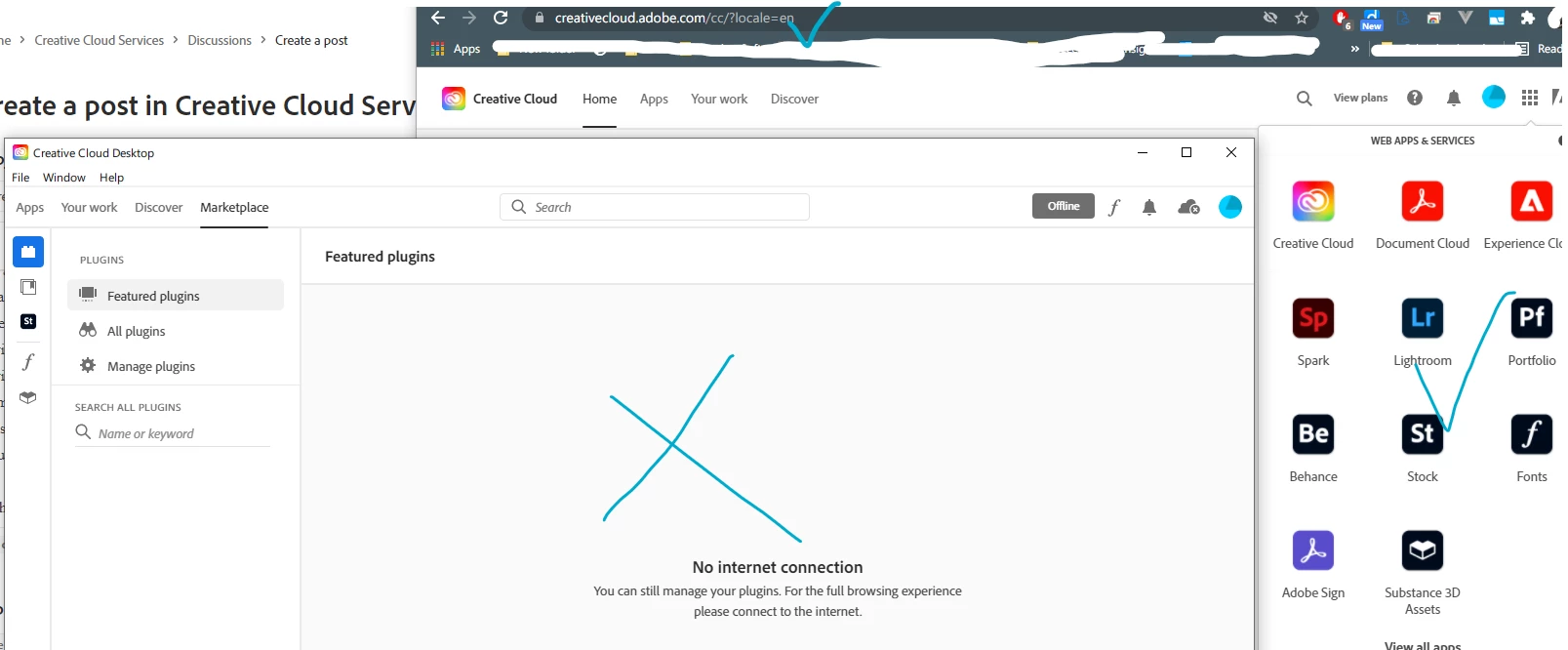
It appears that the logic that Creative Cloud Desktop for Windows uses to determine internet connectivity isn't fool proof. I am not sure what service CCD is trying to contact, but it appears that it may actually tie into Window's itself to figure out if there is an internet connection. I observe this as Windows 10 itself has difficulty with my system (a Gigabyte motherboard with intel wireless 6 card) and oftens reports no internet via wifi, even though I have no connection issues. When Windows reports no internet, CCD says no internet. I am posting this with Windows currently reporting no internet, but I have no connection issues. (no vpn active, no sites dont work, all my other cloud apps and services are connected, etc.) So the bug is with Windows drivers or something, but CCD appears to be affected by it, as it seems to not try to figure out connection on its own, probably because it ties into battery and other Windows services to determine when to sync...
Thank you


 AdChoices