
Known Participant
May 29, 2023
Question

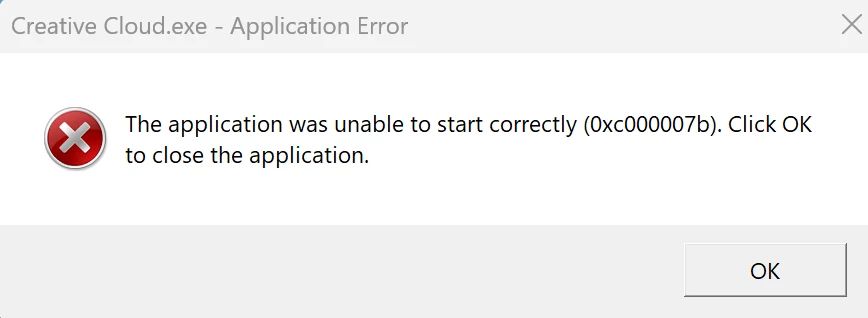
Creative Cloud won't download on M2 Mac using Parallels 18 & Windows 11

  • May 29, 2023
  • 3 replies
  • 4553 views

I've been having lots of trouble downloading Creative Cloud on the Windows side of my 2023 16" M2 MacBook Pro on the WIndows side. 

I've searched around the forum and I even went on the Windows side, and tried to save the installer there still to no avail.

C:/Users/MyUserName/Desktop 


Does anyone know what's going on? I've posted the screenshot below:


This topic has been closed for replies.

3 replies

Nancy OShea
Community Expert
Community Expert
May 29, 2023

Not too surprising.  Creative Cloud isn't certified to work on a) exotic virtual machine set ups or b) M2 chips.

- https://helpx.adobe.com/creative-cloud/system-requirements.html
- https://helpx.adobe.com/download-install/kb/apple-silicon-m1-chip.html


Nancy O'Shea— Product User & Community Expert
AndrewB22Author
Known Participant
May 29, 2023

Thanks for your help! 


Is that something that will come in the future?

Nancy OShea
Community Expert
Community Expert
May 30, 2023

You know as much we do.  Adobe doesn't share their intentions with us.  But I suspect they're working on a compatibility fix for Creative Cloud Desktop.


Nancy O'Shea— Product User & Community Expert
Tarun Saini
Community Manager
Community Manager
May 29, 2023

If you're having trouble downloading Creative Cloud on your M2 Mac using Parallels 18 and Windows 11, there are a few troubleshooting steps you can try:

  1. Check system requirements: Ensure that your M2 Mac, Parallels 18, and Windows 11 meet the system requirements for Creative Cloud. Ensure you have a compatible version of Windows installed and that your Parallels software is up to date. Here is the link to check:- https://helpx.adobe.com/creative-cloud/system-requirements.html
  2. Disable antivirus/firewall: Temporarily disable any antivirus or firewall software on your Windows 11 virtual machine to see if it is blocking the download. Sometimes, these security measures can interfere with the installation process.

  3. Clear temporary files: Delete any temporary files or folders related to the Creative Cloud installation on your Windows 11 virtual machine. You can use the Disk Cleanup utility in Windows to do this.

  4. Check network connectivity: Ensure that your virtual machine has a stable internet connection. Check your network settings and make sure there are no connectivity issues or firewall restrictions that might be preventing the download.

  5. Run Creative Cloud installer as administrator: Right-click on the Creative Cloud installer file and select "Run as administrator" to ensure that it has the necessary permissions to install the software.

  6. Reinstall Parallels Tools: Reinstall Parallels Tools on your Windows 11 virtual machine. Parallels Tools provides additional functionality and performance improvements for virtual machines, so reinstalling it might help resolve any compatibility issues.


Let us know if that helps.


Regards,

Tarun

AndrewB22Author
Known Participant
May 29, 2023

1. It's not clear if M2/Windows 11/Paraellels 18 are compatible. How can I see that info? I am up to dat eon everything.

2. I disabled antivirus/firewall

3. I cleared temporary files

4. Checked netowrk 

5. I ran the installer as adminstator 

6. Re-dowloaded Paralleles Toolbox

No luck at all. Tried the older installers as well. I don't get Error Code 1 anymore but I do get: 

Tarun Saini
Community Manager
Community Manager
May 29, 2023

Thanks for trying the steps. Please check this Youtube video and see if that helps:- https://www.youtube.com/watch?v=zBpeoCzNcx0


If that doesn't help, I'd recommend contacting and working with our support directly as a next step. They can be reached here: https://helpx.adobe.com/contact.html?rghtup=autoOpen


Regards,

Tarun

kglad
Community Expert
Community Expert
May 29, 2023

install the cc desktop app using the "alternative download links" at the bottom of the page at https://helpx.adobe.com/download-install/kb/creative-cloud-desktop-app-download.html

use the desktop app to install your cc programs/trials

NOTE: win 11 users that have trouble with the latest win 10 installer often have success with the older win 10 installer.

AndrewB22Author
Known Participant
May 29, 2023

This is what I get 

AndrewB22Author
Known Participant
May 29, 2023

Edition Windows 11 Pro
Version 22H2
Installed on ‎2/‎18/‎2023
OS build 22621.1778
Experience Windows Feature Experience Pack 1000.22642.1000.0