
Participant
July 2, 2024
Answered

Creative Cloud won't upload tiffs

  • July 2, 2024
  • 4 replies
  • 886 views

Hello All,

I keep getting this message when I try to upload some photos in .tif format: 'Yes, I tried .tif and .tiff.'


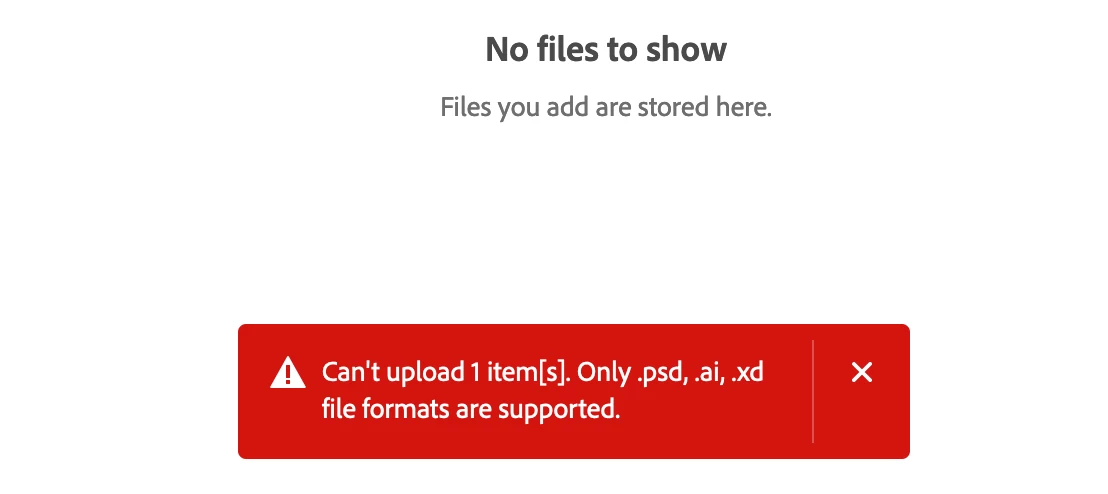
"Can't upload 1 item(s). Only .psd, .ai, and .xi file formats are supported."


This also applies to .jpeg files. Am I missing something basic? I've been searching online for an answer but haven't had any luck so far. This is my university account; could that be the issue?

Thanks.. I'll attach a screen shot.
 

This topic has been closed for replies.
Correct answer Nancy OShea

The Cloud Space you're trying to upload to only supports native file types from Adobe Illustrator (.ai), Photoshop (.psd) or Experience Designer (.xd).


Perhaps you're not uploading to the right Cloud location.


Creative Cloud Assets https://assets.adobe.com
- Synced files
- Cloud documents
- Deleted files

Lightroom https://lightroom.adobe.com
- Photos
- Albums
- Edited files
- Imported files
- Deleted files

Document Cloud https://documentcloud.adobe.com
- All documents
- Starred files
- Shared files

Adobe Express https://www.adobe.com/express/
- Projects
- Brand files
- Graphics
- Web pages
- Videos

4 replies

Nancy OShea
Community Expert
Community Expert
July 2, 2024

Cloud Documents are for files you created from Creative Cloud apps like Photoshop, Illustrator, Adobe XD, Fresco, Aero, and InDesign.

https://helpx.adobe.com/creative-cloud/help/cloud-document-faqs.html


Nancy O'Shea— Product User & Community Expert
mateuszj38732957
Participant
July 15, 2024

https://helpx.adobe.com/creative-cloud/faq
says
"There are no restrictions on the file types you can store in Creative Cloud."

I'm confused. Is it or is not possible to use Adobe Creative Cloud space for storing any type of file?

kglad
Community Expert
Community Expert
July 15, 2024

https://helpx.adobe.com/creative-cloud/faq.html is out of date.  (in fact, it says it was last updated 11/22.)


since the cc sync portion of adobe's cloud storage was removed, you can no longer save general file types.


for enterprise and teams, https://helpx.adobe.com/enterprise/kb/eol-cc-synced-files-for-business-plans.html


for individual subscribers, https://helpx.adobe.com/creative-cloud/kb/eol-creative-cloud-synced-files.html

John T Smith
Community Expert
Community Expert
July 2, 2024

>Am I missing something basic?


What do you not understand?

The message is very clear... Only .psd, .ai, and .xi file formats are supported.

Nancy OShea
Community Expert
Community Expert
July 2, 2024

Not .XI, .XD. 

XD is Experience Designer.


Nancy O'Shea— Product User & Community Expert
Nancy OShea
Community Expert
Nancy OSheaCommunity ExpertCorrect answer
Community Expert
July 2, 2024

The Cloud Space you're trying to upload to only supports native file types from Adobe Illustrator (.ai), Photoshop (.psd) or Experience Designer (.xd).


Perhaps you're not uploading to the right Cloud location.


Creative Cloud Assets https://assets.adobe.com
- Synced files
- Cloud documents
- Deleted files

Lightroom https://lightroom.adobe.com
- Photos
- Albums
- Edited files
- Imported files
- Deleted files

Document Cloud https://documentcloud.adobe.com
- All documents
- Starred files
- Shared files

Adobe Express https://www.adobe.com/express/
- Projects
- Brand files
- Graphics
- Web pages
- Videos

Nancy O'Shea— Product User & Community Expert
Participant
July 3, 2024

Haha! That was it! Go figured it would be something simple. Thank you for your help.

Your "Community Expert" tag is well-deserved.

kglad
Community Expert
Community Expert
July 2, 2024

that is expected.