
Inspiring
September 6, 2021
Answered

Custom domain for Adobe Portfolio - error message

  • September 6, 2021
  • 2 replies
  • 2934 views

I am trying to configure Adobe Portfolio for my domain. I have added the necessary 4 A records, but when I try to do step 3 ("Click Apply") in the Adobe Portfolio wizard , it gives me the error: "Looks like you have AAAA/IPv6 records configured. Please go back to your domain settings and remove any AAAA records".


I have checked in thee DNS console of my domain, and there seems to be no AAAA records there, just the 4 A records that I have defined. Screenshot:
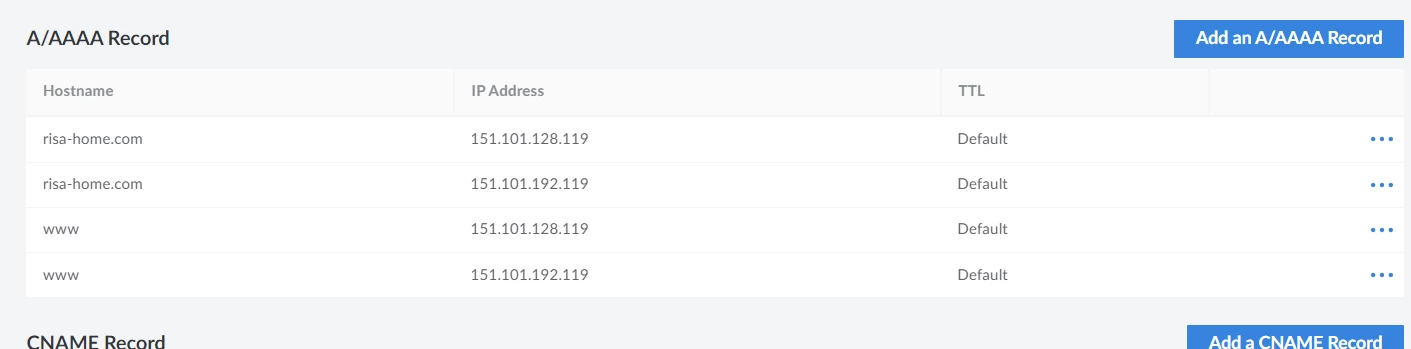


When I run whatsmydns to check, most of the DNS servers returns it correctly, and there are no AAAA records here:

id 52271
opcode QUERY
rcode NOERROR
flags QR RD RA
;QUESTION
risa-home.com. IN A
;ANSWER
risa-home.com. 84659 IN A 151.101.128.119
risa-home.com. 84659 IN A 151.101.192.119
;AUTHORITY
risa-home.com. 84659 IN NS ns1.linode.com.
risa-home.com. 84659 IN NS ns2.linode.com.
risa-home.com. 84659 IN NS ns3.linode.com.
risa-home.com. 84659 IN NS ns4.linode.com.
risa-home.com. 84659 IN NS ns5.linode.com.
;ADDITIONAL


Some of the DNS servers will return the nameservers in the ADDITIONAL part as well - like this:

;ADDITIONAL
ns1.linode.com. 121547 IN A 162.159.27.72
ns1.linode.com. 121547 IN AAAA 2400:cb00:2049:1::a29f:1a63
ns2.linode.com. 121547 IN A 162.159.24.39
ns2.linode.com. 121547 IN AAAA 2400:cb00:2049:1::a29f:1827
ns3.linode.com. 121547 IN A 162.159.25.129
ns3.linode.com. 121547 IN AAAA 2400:cb00:2049:1::a29f:1981
ns4.linode.com. 121547 IN A 162.159.26.99
ns4.linode.com. 121547 IN AAAA 2400:cb00:2049:1::a29f:1b48
ns5.linode.com. 107599 IN A 162.159.24.25
ns5.linode.com. 107599 IN AAAA 2400:cb00:2049:1::a29f:1819

 These are not coming from me, and I cannot do anything with these - I suspect that this is something that some of the nameservers around the world will do themselves. But I am not sure if this is what is causing issues?


This topic has been closed for replies.
Correct answer Nancy OShea

I think it is the same issue.  However, I suggest you contact the Adobe Portfolio Support Team for assistance.   Maybe they can explain it better than I can.

Contact Portfolio Support Team - https://help.myportfolio.com/hc/en-us/requests/new?ticket_form_id=177168


Re-read the instructions below while you wait for a reply from them.

https://help.myportfolio.com/hc/en-us/articles/216489627-Manually-configuring-a-custom-domain


2 replies

Participant
September 22, 2021

I too came across this error, and I solved it by simply leaving the "Connect a domain" wizard and starting again. 

Stein99Author
Inspiring
September 22, 2021

The issue was resolved. I wrote to Adobe support, and they just told me that it could take some time for DNS to propagate. When I then tested the domain - it actually worked fine. I am not sure if anybody at Adobe "did something" or that it resolved itself.

I never got to finish "the last step" of the wizard - but now it works anyway.

Nancy OShea
Community Expert
Community Expert
September 6, 2021
Nancy O'Shea— Product User & Community Expert
Stein99Author
Inspiring
September 7, 2021

The linked issue is not the same as I have. In my case I have created everything necessary, but Portfolio complains that I have AAAA records even if I do not have such records. 

Nancy OShea
Community Expert
Nancy OSheaCommunity ExpertCorrect answer
Community Expert
September 7, 2021

I think it is the same issue.  However, I suggest you contact the Adobe Portfolio Support Team for assistance.   Maybe they can explain it better than I can.

Contact Portfolio Support Team - https://help.myportfolio.com/hc/en-us/requests/new?ticket_form_id=177168


Re-read the instructions below while you wait for a reply from them.

https://help.myportfolio.com/hc/en-us/articles/216489627-Manually-configuring-a-custom-domain


Nancy O'Shea— Product User & Community Expert