
Participant
August 14, 2018
Answered

Deleted Adobe CC files reappear

  • August 14, 2018
  • 1 reply
  • 2223 views

I have been having an ongoing problem for months where all the files which I have deleted from Creative Cloud reappear when I next restart my PC.

I have used 'view on web' and gone to the 'Deleted' folder and permanently deleted them, but it doesn't do a thing, and the very next day it pulls gigabyte upon gigabyte of files from nowhere (they aren't supposed to exist anymore), so that I am right back to the same place I was. I am on 99% full of my 100GB, which means I will no longer be able to use CC very soon.

I wondered whether it was because I occasionally use another PC which is using CC, but today it has done it after a restart, and the other PC has been turned off - so that is not the problem.

Can someone please help?

I am thinking that Adobe CC is not fit for purpose and I need to use Dropbox. Surely there must be a solution?

Many thanks, Emlyn
This topic has been closed for replies.
Correct answer David__B

Hi Emlyn,

Sorry to hear about your difficulties.

Can you explain in more detail what happens when you restart you computer and the files reappear? Do the files immediately reappear or does the restart cause them to start reappearing slowly?

Do you use any backup software on the computer?

Could you try this:

  • Check the size of the local Creative Cloud Files folder
  • Delete extra files both online and on the computer
  • Empty the trash/recycle bin on computer
  • Empty the online deleted files area Adobe Creative Cloud
  • Check the size of the local Creative Cloud Files folder on your computer
  • Check the size of the stored used online here Adobe Creative Cloud
  • Do both the Local folder and the online folder show the correct amount of storage used after freeing up space?
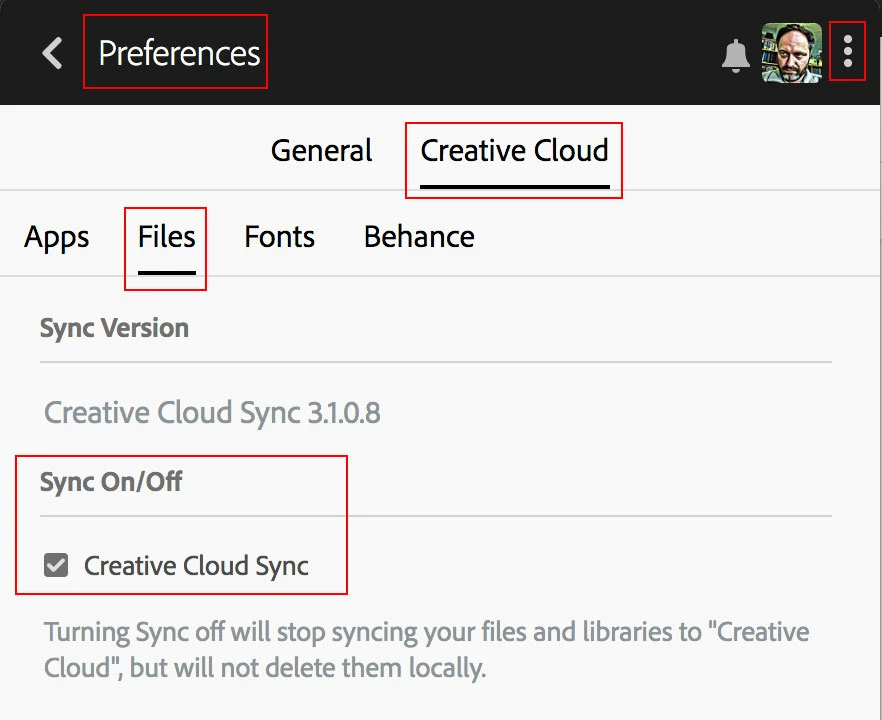
  • Turn off file sync by unchecking the option from the Creative Cloud app preferences

  • Restart the computer
  • Open the local Creative Cloud files folder to see if the deleted items are still gone
  • Check the online folder to see if items are still gone
  • Turn on sync again from the preferences, do files immediately start downloading?

These are a lot of steps but going through them will help me better understand the issue. Could test this and let me know what you find out and see if you can determine whether the deleted files reappear? Are files reappearing online somehow related to the other computer after it gets turned on?

Best,

- Dave

1 reply

David__B
Adobe Employee
David__BCorrect answer
Adobe Employee
August 17, 2018

Hi Emlyn,

Sorry to hear about your difficulties.

Can you explain in more detail what happens when you restart you computer and the files reappear? Do the files immediately reappear or does the restart cause them to start reappearing slowly?

Do you use any backup software on the computer?

Could you try this:

  • Check the size of the local Creative Cloud Files folder
  • Delete extra files both online and on the computer
  • Empty the trash/recycle bin on computer
  • Empty the online deleted files area Adobe Creative Cloud
  • Check the size of the local Creative Cloud Files folder on your computer
  • Check the size of the stored used online here Adobe Creative Cloud
  • Do both the Local folder and the online folder show the correct amount of storage used after freeing up space?
  • Turn off file sync by unchecking the option from the Creative Cloud app preferences

  • Restart the computer
  • Open the local Creative Cloud files folder to see if the deleted items are still gone
  • Check the online folder to see if items are still gone
  • Turn on sync again from the preferences, do files immediately start downloading?

These are a lot of steps but going through them will help me better understand the issue. Could test this and let me know what you find out and see if you can determine whether the deleted files reappear? Are files reappearing online somehow related to the other computer after it gets turned on?

Best,

- Dave