

angryf84
Inspiring
February 8, 2023
Answered

Deleting files from my Creative Cloud is not freeing up space.

  • February 8, 2023
  • 1 reply
  • 989 views

I've been running low on space for my Creative Cloud storage 100 GB. I use this storage space mostly for my Adobe Fresco art and as a way to move files from Photoshop on my Mac to my iPad and vice versa (not Lightroom).


I've been deleting files all day (30 gigs) and then going in and Permanently Deleting them afterwards. I started today with 79 GB of 104 GB used. Now after deleting all those files (after downloading them first to back them up) my CC desktop app says I have used (86 GB of 104GB).


Why is deleting files adding more data to what my account says I have avalible online?


1st please tell your CC people that downloading 10 files at a time is horrible. I really want to stop using the Adobe CC online storage after this huge waste of time. 


That said is there a soultion or a reason for Adobe CC online not to register all the files I've Deleted?


**update**
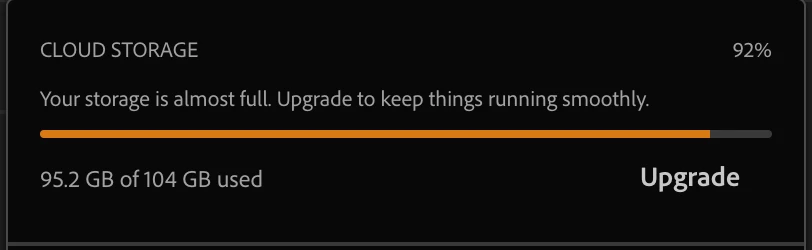
I backed up and deleted 45 gigs of them from CC cloud. Now Cloud Storage is warning me that I'm below 10% avalible space. This must be some problem with your servers? 


This topic has been closed for replies.
Correct answer angryf84

This seems to have resolved itself... it was a either a problem on the server side or some sort of cache problem.  Regardless it showed me some problems with the Adobe CC ecosystem and I would sugest everyone back up all there files locally (good luck with 10 files at a time).

1 reply

kglad
Community Expert
Community Expert
February 8, 2023

make sure your deleted folder is empty then reset the cc desktop app by making sure it's in the foreground, then press:

Win: Ctrl + Alt + R
Mac: Cmd + Opt + R


angryf84
angryf84AuthorCorrect answer
Inspiring
February 8, 2023

This seems to have resolved itself... it was a either a problem on the server side or some sort of cache problem.  Regardless it showed me some problems with the Adobe CC ecosystem and I would sugest everyone back up all there files locally (good luck with 10 files at a time).

kglad
Community Expert
Community Expert
February 9, 2023

good to hear.  (and depending on any cloud service to secure import files is not prudent.)