

drlambert100
Known Participant
February 18, 2021
Question

Device activation limit reached

  • February 18, 2021
  • 9 replies
  • 3528 views

Getting notification about activation limit reached. One of the devices that I need to sign out of, shown in the notification, is actually the device I am using.
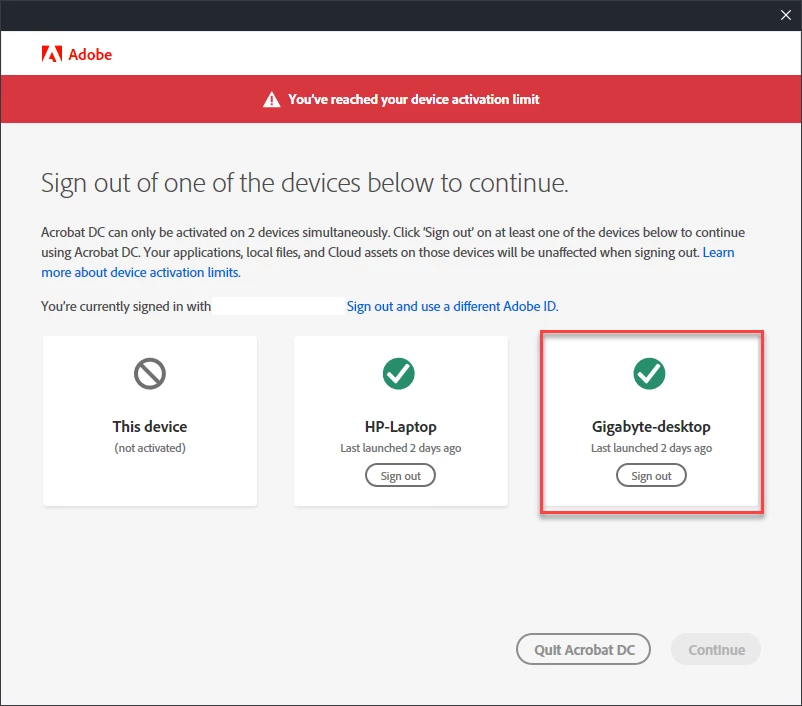
What gives?

9 replies

Participating Frequently
January 24, 2025

After a crash this was a persistent issue for me. Eventually I cleared everything from the list at Activated Devices (one device) and the issue was resolved. 


Go here, and remove devices : https://account.adobe.com/activated-devices

Hope that helps. 

Participating Frequently
July 30, 2022

There doesn't appear to be a UserVoice page for the creative cloud desktop app?

Nancy OShea
Community Expert
Community Expert
July 31, 2022
quote

There doesn't appear to be a UserVoice page for the creative cloud desktop app?


By @tashi.hope

===========

Nope. Looks like they discontinued it.  Adobe has been moving away from UserVoice.


Nancy O'Shea— Product User & Community Expert
Participating Frequently
July 31, 2022

Oh god really? Are they gonna replace it I wonder? Maybe user feedback from paying customers is too annoying for them lol

Inspiring
July 15, 2022

The deal is that you can only be signed in with the same Adobe ID on two computers at the same time. So what i think you're saying here is that you are really only signed in on two computers, but it thinks you are signed in on three? So, "this device" and "gigabyte desktop" are actually the same machine? Yes, I can see how that would be super annoying.


I'm not sure how to fix it, but I hear your frustration and hope to help elucidate the question so those who know can answer it. 

Nancy OShea
Community Expert
Community Expert
July 15, 2022

Creative Cloud products can be deactivated from devices via your online account. Log-in below.

https://account.adobe.com/activated-devices


This does not work with legacy Creative Suite or single purchased Elements products which have  an alloted number of possible activations per license. If you require more, contact Adobe to reset your activation count.


If your computer is not remembering your Creative Cloud log-in, please see link below.

https://helpx.adobe.com/in/manage-account/kb/troubleshoot-creative-cloud-sign-out-sign-in.html


Hope that helps.


Nancy O'Shea— Product User & Community Expert
Participating Frequently
July 15, 2022

I'VE HAD THIS ISSUE FOR YEARS, different machines, different OS.

[Edited by moderator]

Nancy OShea
Community Expert
Community Expert
July 15, 2022

Actually less hassle would be to buy modern software.  😉


Nancy O'Shea— Product User & Community Expert
Jon-M-Spear
Legend
February 27, 2021

This has been happening to me over the past 4 days.  Again!  It sticks its ugly head up every few months - and has done over a number of years now.  During this time Adobe has never given a satisfactory explanation.


Yesterday, once again, I reached the device activation limit, although I only have one activated PC.  After deactivating it, I logged back in, only for it to happen again today.   In addition, for the past few days, I have had to sign in to Adobe Cloud every time I use an app, even though it may have been moments after closing it down.


I know this is a user forum, but Adobe technical staff do look in occasionally.  Please Adobe, sort this issue out permanently.  This together with the frustratingly long start up of the latest versions of LrC and Ps, I'm fast becoming a dissatisfied user of some 30 years.


Legend
February 26, 2021

Drlambert, I agree, nobody seems to understand your question though I thought it was perfectly clear. I wish I had an answer, you are not the only person to see this.  

drlambert100
Known Participant
February 26, 2021

Thank you. Finally, someone understands the issue.

Inspiring
February 26, 2021

Hi drlambert100,


Thank you for posting your query here.


I understand that the Device name "Gigabyte-deskop" is the one that you were using while you got the prompt to Sign out from the same device.


If you've already activated your Creative Cloud subscription on two computers, you'll first need to deactivate it on one of the systems.

  1. Sign out to deactivate Creative Cloud on one of the two computers. ( Preferably Sign out from the Creative Cloud Desktop App manually and not from the online prompt when you see the Activation limted reached).
  2. Sign in to activate Creative Cloud on the new computer.


Hope this helps. 


Thank you. 

drlambert100
Known Participant
February 26, 2021

OK, I'm having a little trouble here. Am I not clear? Why should I have to sign out of the device I'm using just so I can sign back in to it. Doesn't make much sense to me.

Inspiring
February 26, 2021

I believe the simplest option that you may follow is :

- Launch Creative Cloud App in all your three devices

- Sign out Manually from the Creative Cloud Desktop App from all devices ( NOT from the online prompt when you see the Activation limted reached)

- Sign in and use the Product in One device at a Time as you have agreed in the End User License Agreement ( please refer to the following terms of use :  https://www.adobe.com/in/legal/licenses-terms.html 


Hope this helps. 


Thank you.


drlambert100
Known Participant
February 26, 2021

It has happened again. This morning there was an update to Windows and when I used Adobe Acrobat DC, I had to sign out of this machine so I could use the software on this same machine. Come on Adobe. FIX this.

Nancy OShea
Community Expert
Community Expert
February 26, 2021

Only two devices can be activated at one time.

Sign-out of the one you're not using. Sometimes overlaps occur.


Go to your Adobe account to manage devices.

https:/account.adobe.com/plans


Nancy O'Shea— Product User & Community Expert
drlambert100
Known Participant
February 26, 2021

Read the rest of the post. One of the devices I'm being told to sign out of is the device I'm using.

Peru Bob
Community Expert
Community Expert
February 18, 2021

Sign out and then sign in.

drlambert100
Known Participant
February 18, 2021

I did but why should I have to? Occasionally, I open on a third computer and have to sign out of one of the two shown to be able to use on third device. This appears to be a problem with where Adobe stores the activation file on the local computer as it always happens after a Windows update.