
Participant
June 14, 2022
Answered

Download but not edit an image

  • June 14, 2022
  • 1 reply
  • 396 views

Is there a way to share a CC library with others in the company (who do not have an Adobe ID) where they can download images in the library but not edit the library (save, rename, etc)? The only option I see is to share a link where people can edit Edit or View (but not download).
This topic has been closed for replies.
Correct answer Tarun Saini

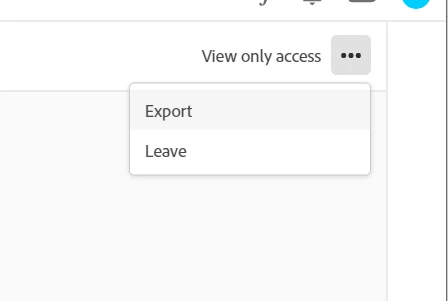
Thanks for the response. I would like to inform you that the invited user can go to assets.adobe.com and click on ‘Your Libraries’ and then open the library, then find the element they want, click on the ‘---’ button which is on the right-hand side, and then click on Download or the other way to do that is to open the Creative Cloud Desktop app and try ‘Export a copy’.


Please check the screenshot attached below.


Let us know how it goes.


Regards,

Tarun


1 reply

Tarun Saini
Community Manager
Community Manager
June 15, 2022

Hi @Michelle23960173qk80 


Thanks for reaching out. You can share libraries with your team using the Creative Cloud website, the Creative Cloud desktop app, or any of your Creative Cloud desktop apps. Your team members need either a free or a paid Creative Cloud membership to use Creative Cloud Libraries.


Please check this article for more information: https://helpx.adobe.com/creative-cloud/help/libraries.html

Also, click here to check on how to collaborate on Creative Cloud libraries and folders: https://helpx.adobe.com/creative-cloud/help/collaboration.html#collaborate_libraries


Let us know how it goes.


Regards,

Tarun

Participant
June 15, 2022

Hi @Tarun Saini 


I understand how to share libraries. I want people to be able to DOWNLOAD a file but not be able to EDIT the library. As far as I can tell, people can't download an image if they are set to VIEW.