Hi T Cox,
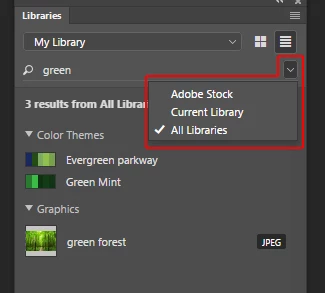
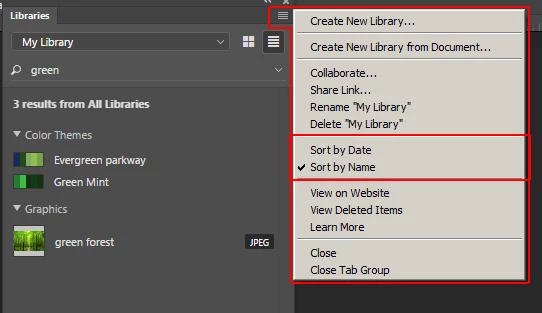
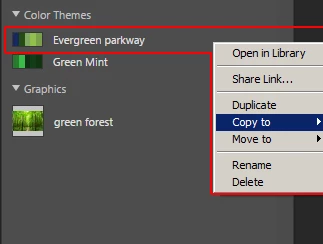
Great question. Library organization and management options is an area that Adobe is planning to improve and add more features, so there are changes coming that will add more options and make this easier. Until those become available, I think the naming of assets within a library and naming of libraries themselves are important or key considerations when working with a lot of assets. The reason being, is the search options for "search all libraries" or "search the current library" and the sort options being by date or by name. I think the option to search across libraries being the most useful. I often will search across libraries and then copy assets I need for a particular project into a new project library when needed using the Copy to option from the context menu of an asset. So that's my personal recommendation.
I'd also suggest familiarizing yourself with the content in these articles. Knowing what assets can be used cross product, collaboration options, across computers etc. is helpful.
https://helpx.adobe.com/creative-cloud/help/libraries.html
https://helpx.adobe.com/creative-cloud/how-to/creative-cloud-libraries.html
and any products you're using libraries within. These are same as what is in the Desktop applications table in the first article.
https://helpx.adobe.com/photoshop/using/cc-libraries-in-photoshop.html
https://helpx.adobe.com/illustrator/using/creative-cloud-libraries-sync-share-assets.html
https://helpx.adobe.com/indesign/using/creative-cloud-libraries-sync-share-assets.html
https://helpx.adobe.com/after-effects/using/creative-cloud-libraries.html
https://helpx.adobe.com/premiere-pro/using/creative-cloud-libraries.html
https://helpx.adobe.com/muse/using/creative-cloud-libraries.html
https://helpx.adobe.com/xd/help/cc-libraries-xd.html
Hope that helps,
- Dave



 AdChoices