



rachelcenter
Legend
February 6, 2026
Question

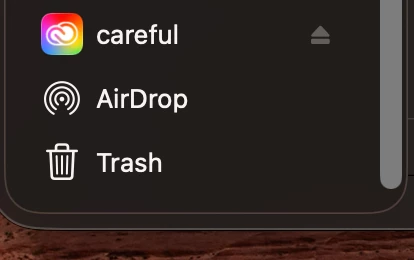
ever since i updated creative cloud my external hard drive icons now default to creative cloud icon. how do i fix this

  • February 6, 2026
  • 4 replies
  • 407 views

ever since i updated creative cloud my external hard drive icons now default to creative cloud icon on left hand panel of finder window. this is not normal. how do i fix this? see attached screenshot. SSD drive is called “careful”. Computer restart did not rectify this. creative cloud version 6.8.1.865. mac os tahoe 26.2
 

    4 replies

    Inspiring
    March 25, 2026

    I had the same problem and Apple helped sort out the problem, found that Creative Cloud  File Provider extension was the problem. It does not affect a different user account. Creative Cloud is version 6.9.0.618.1. On M1 based Mac mini running macOS 26.4 Tahoe. Also this problem does not exist under macOS 15.7.5 Sequoia. What exactly or more to the point where exactly is this file. It seems to not be necessary at least for the two apps I use, PS and LrC. It’s only needed to access your files on Adobe Cloud:

    The Adobe File Provider Creative Cloud extension is a component designed to integrate Adobe Creative Cloud files directly into the native file management systems of operating systems, primarily macOS, to facilitate seamless file synchronization, access, and management. It allows users to manage assets stored in the Creative Cloud, including cloud documents (PSDC, AIC, XD), directly within applications and finder windows, rather than relying solely on a web browser or the Creative Cloud desktop app. 

    Key Aspects of the Extension:
    macOS Integration: It works in conjunction with Apple's File Provider extension framework to present cloud-based files as if they were local files in Finder. 

    Asset Management: It enables users to browse, search, and manage Creative Cloud Libraries and cloud documents within Adobe apps like Photoshop, Illustrator, and InDesign. 

    Workflow Efficiency: It streamlines the process of accessing, opening, editing, and syncing files without having to constantly switch to the Creative Cloud desktop application. 

    Supported Content: The extension facilitates the handling of various file formats, including Creative Cloud Libraries, shared assets, and Adobe Stock images. 

    On macOS, this extension is crucial for enabling the "cloud-first" approach for files such as Photoshop Cloud Documents (PSDC), allowing them to appear in the file system for opening and saving while managing the syncing in the background.

    kglad
    Community Expert
    Community Expert
    March 25, 2026

    apple is aware of the problem.

    Inspiring
    March 25, 2026

    Wonderful. Is Adobe aware of their problem? I don’t use the cloud storage element anyway.

    Participating Frequently
    February 10, 2026

    Whoever thought this was a good idea is an absolute idiot.

    kglad
    Community Expert
    Community Expert
    February 10, 2026

    it’s not by design.

    Participating Frequently
    February 10, 2026

    Its a bug?

    Nevenko
    Known Participant
    February 7, 2026

    Go to your settings > Login Items & Extensions, find the Adobe Creative Cloud, and if File Provider is enabled, disable it. That is for now, I hope it will be fixed someday.

    TheRedSeth
    Participant
    February 13, 2026

    This fixed me. Thanks

    kglad
    Community Expert
    Community Expert
    February 6, 2026

    google your os and how to fix the problem.

    rachelcenter
    Legend
    February 12, 2026

    I am. chatgpt is running me through a few ways to try and fix it and so far nothing is working. It told me “The fact that now your (name disclosed) server icon also turned into a Creative Cloud icon tells me this is not a normal Finder cache glitch. This is almost certainly Adobe’s File Provider system hijacking the sidebar volume representation.”

    kglad
    Community Expert
    Community Expert
    February 12, 2026

    ok