
Participant
January 13, 2016
Answered

Failed to start CoreSync for Creative Cloud on Mac OS X Yosemite

  • January 13, 2016
  • 2 replies
  • 4170 views

I'm trying to install the Creative cloud onto my Mac OS X Yosemite. However it is saying it is has Failed to start CoreSync. How can I resolve this so it is installed on my mac?
This topic has been closed for replies.
Correct answer Sheena Kaul

Hi Sheena,

I deleted the AAMupdater folder from ~/Library/Application Support/Adobe/

and I also Renamed the opm.db file under   ~/Library/Application Support/Adobe/OOBE,

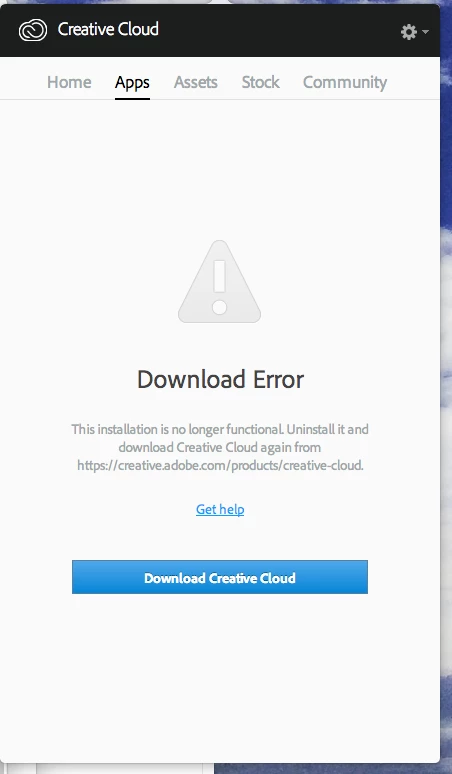
but it is coming up with the same error message as seen below.

I don't understand what to do next from Creative Cloud - Download error - stubborn error

what should I do?


Please try the steps below:

2 replies

Participant
January 15, 2016

Great! finally it worked! thanks so much.

Sheena Kaul
Legend
January 17, 2016

You are welcome!

Participant
January 13, 2016

This what it looks like and says

Sheena Kaul
Legend
January 13, 2016

Hi,

I believe you are getting the 'Download error' in the Apps panel.

Please refer to the help document below:

Download Error in Apps tab of Creative Cloud Desktop Application

You may also refer to the threads below:

https://forums.adobe.com/thread/1832357

Creative Cloud - Download error - stubborn error

Re: Creative Cloud "Download Error" message

Regards,

Sheena

Participant
January 13, 2016

Hi Sheena,

I deleted the AAMupdater folder from ~/Library/Application Support/Adobe/

and I also Renamed the opm.db file under   ~/Library/Application Support/Adobe/OOBE,

but it is coming up with the same error message as seen below.

I don't understand what to do next from Creative Cloud - Download error - stubborn error

what should I do?