
Participant
June 19, 2020
Question

File Icon error

  • June 19, 2020
  • 1 reply
  • 629 views

I have installed CC 2018 versions of Premiere Pro , After Effects and Photoshop. 

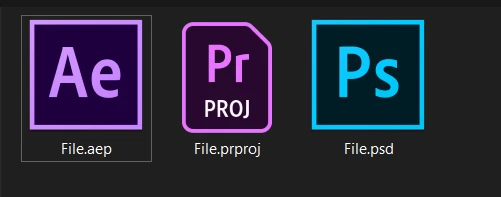
My problem is that the .psd files and .aep files are saved in my computer with the icons of Photoshop and After Effects instead of the PSD file icon and the AEP file icon. Recently .prproj files also had the same problem, But it resolved automatically. I will attatch a image to show what I am talking about. Please help me as soon as possible...

Regards
 

    This topic has been closed for replies.

    1 reply

    Just Shoot Me
    Legend
    June 19, 2020

    Please Edit you post to remove the Attached screen shot and Include it in the body of the text of your post.

    You do that by Clicking the "More..." link at the bottom of your post, Selecting "Edit Message" and then use the "Insert Photos" icon in the tool bar at the top of the Post/Reply/Edit dialog box like this.

    Participant
    June 20, 2020

    Sir, Did you get it ? Please tell me what to do...


    Just Shoot Me
    Legend
    June 22, 2020

    Yes you placed the screen shot in with the text of your post but I do not have a solution for you.


    I do have a question.

    How, Why did you install the 2018 versions of these programs.