

MarcelMe
Participant
April 13, 2023
Question

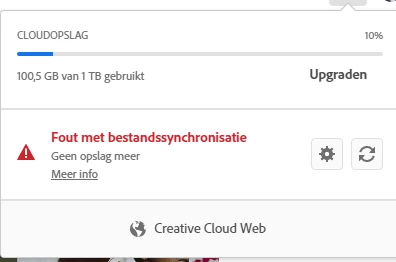
File sync error. No more storage but actual storage space is less then limited

  • April 13, 2023
  • 1 reply
  • 507 views

In trying to save a design I received a message that file cannot be saved due to fact that there is no more storage space.


When checking via Creative cloud web I am using only 10% of available storage space. 

What is wrong here?
 

This topic has been closed for replies.

1 reply

kglad
Community Expert
Community Expert
April 13, 2023

to clear or check all files stored on adobe's servers, use a web browser to navigate to the following locations. at each location there are several folders to check.:


https://assets.adobe.com

https://lightroom.adobe.com

https://documentcloud.adobe.com

https://spark.adobe.com


if you delete anything from any of these locations, check for a deleted folder where your file(s) was (were) moved. if you want to clear space you must delete files in the deleted folder.

MarcelMe
MarcelMeAuthor
Participant
April 21, 2023

Issue is still there. I cleared space in all above locations resulting that in Creative Cloud the storage is even reduced to below 38 GB (of the 1 TB).  Fyles are still not synched. Free local storage space on my devices is larger then 250 GB. 

So why does is it not work??? 

kglad
Community Expert
Community Expert
April 21, 2023

does that error message only say there's a file sync error, or does it actually say there's a file sync error because of a lack of storage space.