

frajerdance
Participant
July 15, 2021
Answered

Getting back cloud files

  • July 15, 2021
  • 1 reply
  • 341 views

Hey Everyone.

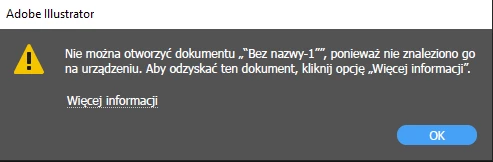
So lateliy I had some error with Adobe Creative Cloud and when it get fixed, I lost access to files in Cloud. I can see them but I can't open them in Illustrator. It says that file I'm trying to open is missing on my device. And if I want to get it back it takes me to website which doesn't exist. Is there any chance to get my files back?

 

This topic has been closed for replies.
Correct answer Nancy OShea

Go directly to the Creative Cloud website below. 


Creative Cloud Assets https://assets.adobe.com
Synced files
Cloud documents
Deleted files

Lightroom https://lightroom.adobe.com
Photos
Albums
Edited files
Imported files
Deleted files

Document Cloud https://documentcloud.adobe.com
All documents
Starred files
Shared files

Adobe Spark https://spark.adobe.com
Projects
Brand files
Graphics
Web pages
Videos


1 reply

Nancy OShea
Community Expert
Nancy OSheaCommunity ExpertCorrect answer
Community Expert
July 15, 2021

Go directly to the Creative Cloud website below. 


Creative Cloud Assets https://assets.adobe.com
Synced files
Cloud documents
Deleted files

Lightroom https://lightroom.adobe.com
Photos
Albums
Edited files
Imported files
Deleted files

Document Cloud https://documentcloud.adobe.com
All documents
Starred files
Shared files

Adobe Spark https://spark.adobe.com
Projects
Brand files
Graphics
Web pages
Videos


Nancy O'Shea— Product User & Community Expert