Participant
February 25, 2024
Question

Help with Adobe Portfolio Website

  • February 25, 2024
  • 1 reply
  • 1079 views

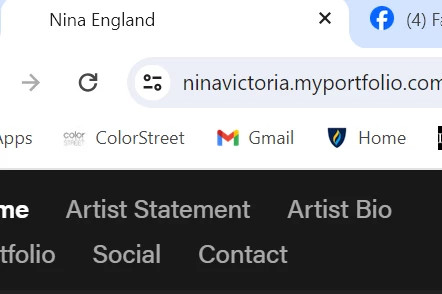
I've created my website through Adobe Portfolio and have an irritating issue. While viewing my website, you can see in the browser tab it says "Nina England" which is my old last name and I cannot figure out how to fix that. I made sure to update my Adobe Creative Cloud Account profile name to reflect my new last name, though this issue still persists. Obviously I'm missing something, does anyone know how I can correct this? It's super annoying when I share my website with people, the thumnail hyperlink also says Nina England, and they ask why. It's embarrassing that I don't know how to correct this. 


Can anyone assist me?


This topic has been closed for replies.

1 reply

Conrad_C
Community Expert
Community Expert
February 25, 2024

You know, a while ago I was wondering about this too, and after seeing your question I decided to figure it out. The name can appear in multiple places because there are technically different forms of it, so it took a little while to track down where they all are. And I am not sure if these are all of them. 


The name that appears in a web site Location field is the URL address subdomain. You can change this in Settings, Domain Name.


The name that appears in the title bar or tab in web browsers is the HTML web page title. You can change this in Settings, Search Optimization.


The name that appears by default on the web pages themselves is the Site Name / Text option. You can change this as shown in the picture below.


kglad
Community Expert
Community Expert
September 6, 2024

thanks for answering @Conrad_C