LarrySDS
Participant
May 23, 2018
Answered

How do I cancel cloud storage and what happens to my photos

  • May 23, 2018
  • 2 replies
  • 7777 views

How do I cancel cloud storage and what happens to my photos

?

Correct answer David__B

Hi Larry,

It looks like you have a Photography Plan.

This article addresses some of your questions in the Storage and cloud services section

Adobe Creative Cloud FAQ

What happens to my files in the Creative Cloud if I cancel or downgrade my membership?


Your Creative Cloud files are stored on your desktop as well as on the Creative Cloud servers. If you cancel or downgrade your paid membership, you still have access to all of the files in the Creative Cloud folder on your computer and via the Creative Cloud website.

Your account will be downgraded to a free membership, which includes 2 GB of storage. If you’re using more than 2 GB of storage, you won't be able to upload new files to the cloud. To upload new files, delete files on the Creative Cloud server until the amount of storage

you're using drops below 2 GB.

If you're over your storage limit, you have 90 days to reduce your online usage. After 90 days, you could lose access to some or all of your files saved on the Creative Cloud servers.

You're not required to use the cloud storage portion of your membership if you don't want/need to.

Lightroom online is also part of your cloud storage

Photo Editor | Online Photoshop Lightroom

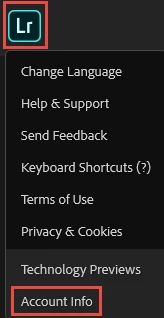
If you click on the LR logo in the top left you can delete any content from the Account Info section
Hope that helps,

- Dave

2 replies

David__B
Adobe Employee
David__BCorrect answer
Adobe Employee
May 23, 2018

Hi Larry,

It looks like you have a Photography Plan.

This article addresses some of your questions in the Storage and cloud services section

Adobe Creative Cloud FAQ

What happens to my files in the Creative Cloud if I cancel or downgrade my membership?


Your Creative Cloud files are stored on your desktop as well as on the Creative Cloud servers. If you cancel or downgrade your paid membership, you still have access to all of the files in the Creative Cloud folder on your computer and via the Creative Cloud website.

Your account will be downgraded to a free membership, which includes 2 GB of storage. If you’re using more than 2 GB of storage, you won't be able to upload new files to the cloud. To upload new files, delete files on the Creative Cloud server until the amount of storage

you're using drops below 2 GB.

If you're over your storage limit, you have 90 days to reduce your online usage. After 90 days, you could lose access to some or all of your files saved on the Creative Cloud servers.

You're not required to use the cloud storage portion of your membership if you don't want/need to.

Lightroom online is also part of your cloud storage

Photo Editor | Online Photoshop Lightroom

If you click on the LR logo in the top left you can delete any content from the Account Info section

Hope that helps,

- Dave

tracie faithe
Participant
August 20, 2021

What I cannot find is a way to cancel the storage portion without cancelling the app subscription.


How do I cancel the extra storage only?


Thanks in advance for any help you can give.

kglad
Community Expert
Community Expert
May 23, 2018

