
cteachman
Participant
February 2, 2015
Answered

How do I download assets from the cloud via the web browser?

  • February 2, 2015
  • 2 replies
  • 722 views

Hello!  I have Adobe Cloud installed on my desktop in my office, but sometimes I need to be able to download the assets to a remote desktop. I can upload, archive, share on Behance, send a link via the web browser, but I don't see an option to download them. What right-click am I missing?

Thank you in advance for any assistance!!!
This topic has been closed for replies.
Correct answer wharress

Hi,

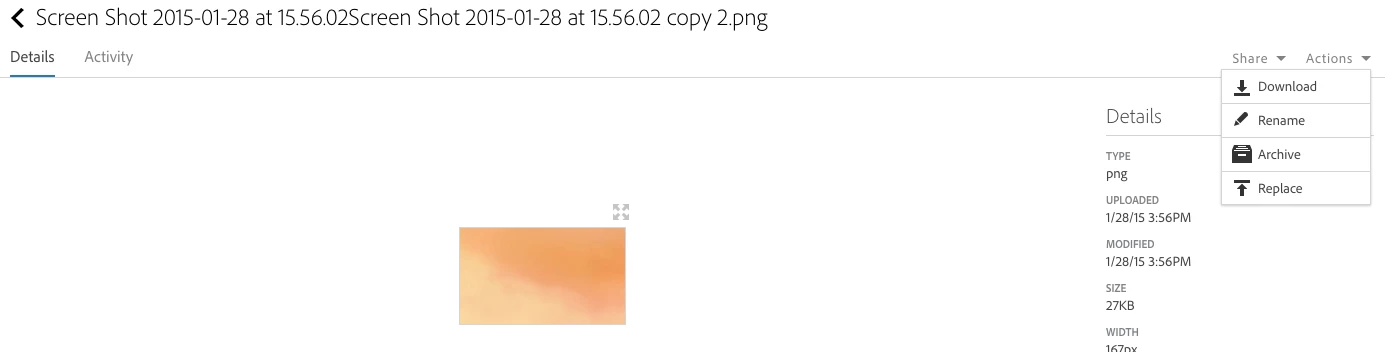
If you visit the Creative Cloud website and select an asset, you will see "Actions" on the top right hand side of the screen. A download link will then be displayed. See my attached screen shot.

I hope this helps.

Thanks

Warner

2 replies

cteachman
cteachmanAuthor
Participant
February 4, 2015

It's always something simple, isn't it? I was trying to download from the file list, one screen before that. THANK YOU SO MUCH! You have just saved me a lot of time!

wharress
Participating Frequently
February 4, 2015

No problem! glad I could help. If you any other questions just let us know

Thanks

Warner

wharress
wharressCorrect answer
Participating Frequently
February 3, 2015

Hi,

If you visit the Creative Cloud website and select an asset, you will see "Actions" on the top right hand side of the screen. A download link will then be displayed. See my attached screen shot.

I hope this helps.

Thanks

Warner