
How do I get rid of this error message without installing Creative cloud again?
I have an iMac and had a trial version of Creative cloud long ago. I've uninstalled Creative cloud since. But for the last month or so, I keep getting this error message every day, and it's hard to click away - it places itself over the browser as an active window, won't be placed in the background, and it seems hard to choose any of the two alternatives - they don't react when clicked on.
Anyone, How do I get rid of this error message without installing Creative cloud again and paying for it? This is almost like some kind of ransomware...
I realised now that the error message is in Swedish, in English it means something like: Adobe Creative Cloud is needed to solve this problem, but it's missing or damaged. Download and install a new copy of Creative cloud from (link). Alternative buttons: Dismiss. Repair.
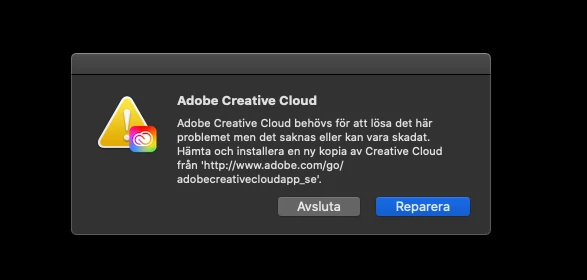
The link (not even clickable) takes me to a loop where I have to sign up and pay for Creative cloud, which I really don't want to do at all.a
Please help.


 AdChoices