DeSotoKansas
Participant
May 11, 2015
Answered

How do I get the collaboration option on my Creative Cloud files?

  • May 11, 2015
  • 1 reply
  • 975 views

I am trying to allow a collaboration on my Adobe Muse site and am following the directions set forth on the Adobe help board.  However, when I right click I do not have the option to click collaborate.  Do I need a certain subscription for this or what am I doing wrong?

This topic has been closed for replies.
Correct answer Ken G. Rice

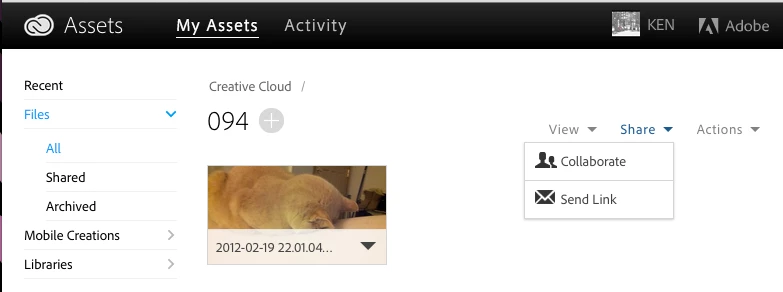
Please explain in more detail: "I went back to collaborate them again and now the options are not able to be selected." Please use screenshots if possible. Below is what I am seeing.

On my desktop in the Creative Cloud Files folder I see:

In the web application I see:

1 reply

Ken G. Rice
Community Manager
Community Manager
May 11, 2015

With the Creative Cloud Files on your desktop you can only Collaborate on a folder. With a files you can do Share Link (called Send Link for files and folders from the web application at https://assets.adobe.com).

Help / FAQs:

DeSotoKansas
Participant
May 11, 2015

Okay. That makes sense.  So I put the file in a folder then tried the collaboration just to see if it would work.  It worked fine, however I did not add any emails because I am not ready for that step yet.  I went back to collaborate them again and now the options are not able to be selected. 

Ken G. Rice
Community Manager
Ken G. RiceCommunity ManagerCorrect answer
Community Manager
May 11, 2015

Please explain in more detail: "I went back to collaborate them again and now the options are not able to be selected." Please use screenshots if possible. Below is what I am seeing.

On my desktop in the Creative Cloud Files folder I see:

In the web application I see: