Participating Frequently
September 7, 2023
Answered

How do I see projects that I "liked" on Behance?

  • September 7, 2023
  • 3 replies
  • 11760 views

I don't see where they were saved

Correct answer Fogolin

This is so stupid of Adobe to not have it more easily accessible for people to review projects that they liked, but you can do it: just go to your profile > appreciations

This will take you to "Insights" for some dumb reason, but the left tab next to it is "Appreciations" and you can finally get to your "likes". Here, have a 1,2, 3 step picture:
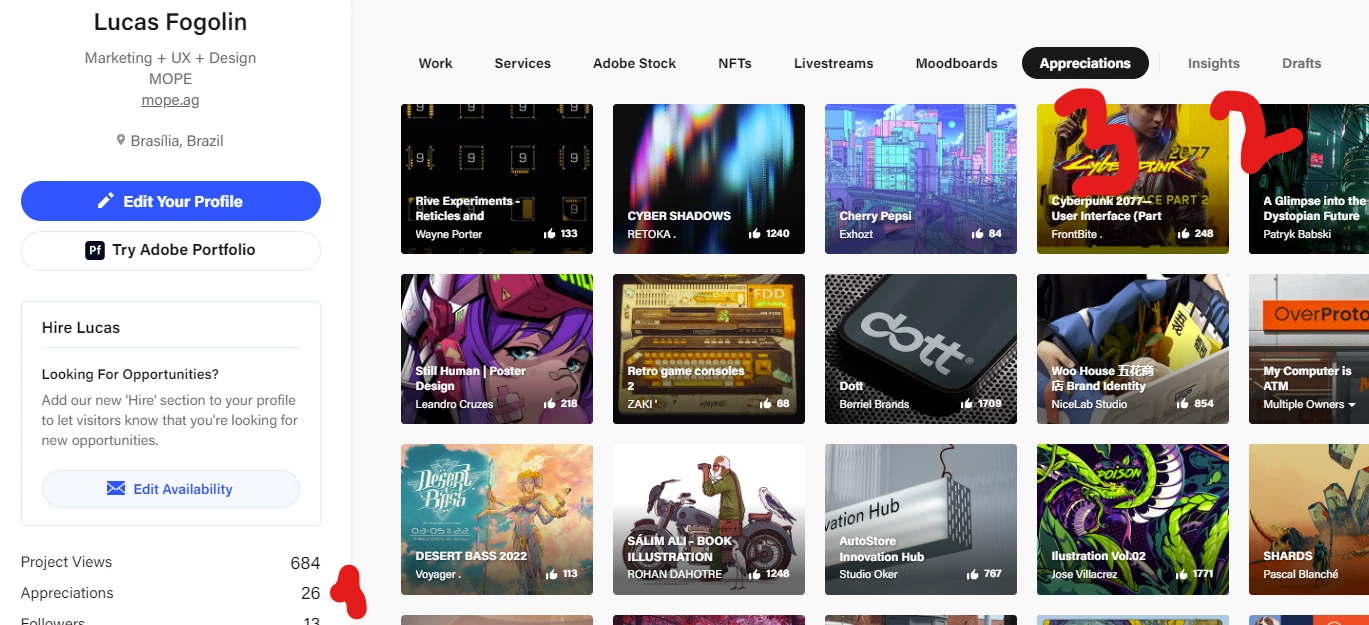

The url is  https://behance.net/{YOUR USER NAME HERE}/appreciated

3 replies

Fogolin
FogolinCorrect answer
Participant
October 3, 2023

This is so stupid of Adobe to not have it more easily accessible for people to review projects that they liked, but you can do it: just go to your profile > appreciations

This will take you to "Insights" for some dumb reason, but the left tab next to it is "Appreciations" and you can finally get to your "likes". Here, have a 1,2, 3 step picture:


The url is  https://behance.net/{YOUR USER NAME HERE}/appreciated

Participating Frequently
October 3, 2023

Thank you! Yes weirdly not intuitive. 

kglad
Community Expert
Community Expert
September 7, 2023
Participating Frequently
September 7, 2023

So that actually doesn't return images that I "liked". It shows images that other people liked. 

kglad
Community Expert
Community Expert
September 7, 2023

see if you can adjust the settings.

John T Smith
Community Expert
Community Expert
September 7, 2023

Sorry, not supported here... You need to go here for Behance help https://help.behance.net/hc/en-us

Participating Frequently
September 7, 2023

But behance doesn't have a forum. And those FAQs don't address my question.
