Inspiring
Feb 27, 2020 10:29 AM UTC
Answered

How do you align left and right align text with adobe Portfolio footer.

I have been trying to left align my copyright notice, and right align the Power by Adobe Portfolio on the same line.  


I tried using align = "left" and align = "right"  in the coding but I get nowhere with it.


This is what I am trying to do within page footer in Adobe Portfolio


©Trevor Dawkins Photography                                                                                                      Powered by Adobe Portfolio


I have not been able to get the spaces to show up when using the text box.

Can anyone help me with this please.

Trevor 

This topic is closed to new replies. Start a new post to keep the conversation going.
Nancy OShea
Nancy OSheaCorrect answer
Community Expert
Feb 27, 2020 11:12 PM UTC

Sadly, Portfolio has no community forum at this time.  I'm moving this topic to Get Started where I field most of the Portfolio questions.


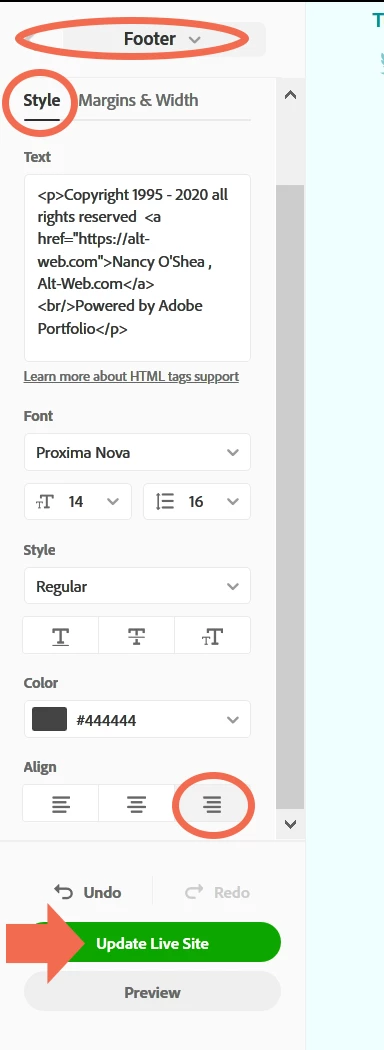
If your theme supports footer text alignment, you should see buttons for it in the lower part of your Footer panel.  See screenshot below.


Post back if you have more questions. 


Nancy O'Shea— Product User & Community Expert

4 replies

Participant
Jul 19, 2020 7:33 AM UTC

My text logo has become Vertical in alignment. How to change it to Horizontal aligned?

Translate
Nancy OShea
Community Expert
Community Expert
Jul 19, 2020 7:01 PM UTC

Not sure what you mean.  This topic is about aligning text in the footer.  Please post a URL to your Portfolio site. Failing that, please post screenshots showing the problem.


Translate
Nancy O'Shea— Product User & Community Expert
Nancy OShea
Community Expert
Nancy OSheaCommunity ExpertCorrect answer
Community Expert
Feb 27, 2020 11:12 PM UTC

Sadly, Portfolio has no community forum at this time.  I'm moving this topic to Get Started where I field most of the Portfolio questions.


If your theme supports footer text alignment, you should see buttons for it in the lower part of your Footer panel.  See screenshot below.


Post back if you have more questions. 


Translate
Nancy O'Shea— Product User & Community Expert
LinSims
Community Expert
Community Expert
Feb 27, 2020 1:47 PM UTC

This website is for support of Adobe's CC and TCS products. Adobe Portfolio help is supported on a separate website: http://help.myportfolio.com/


You will need to repost your question there.


The Community Help forum is for help in how to use the Adobe Communities. Product questions should be posted in the associated product community.

Translate