
Participant
February 8, 2021
Answered

How to access Creative Cloud storage without saving cloud to desktop

  • February 8, 2021
  • 1 reply
  • 1316 views

Hi,
I have limited disk space on my PC. I need to use Creative Cloud and it's applications to access documents from different computers and locations, but I do not wish to save these documents to each computer. That's what I wanted the cloud for, storage.

Is there a feature that I'm missing where I can access my storage to just get the files I want at a given time without downloading all of it to my PC first? Thanks in advance for the help.

-SRM
This topic has been closed for replies.
Correct answer kglad

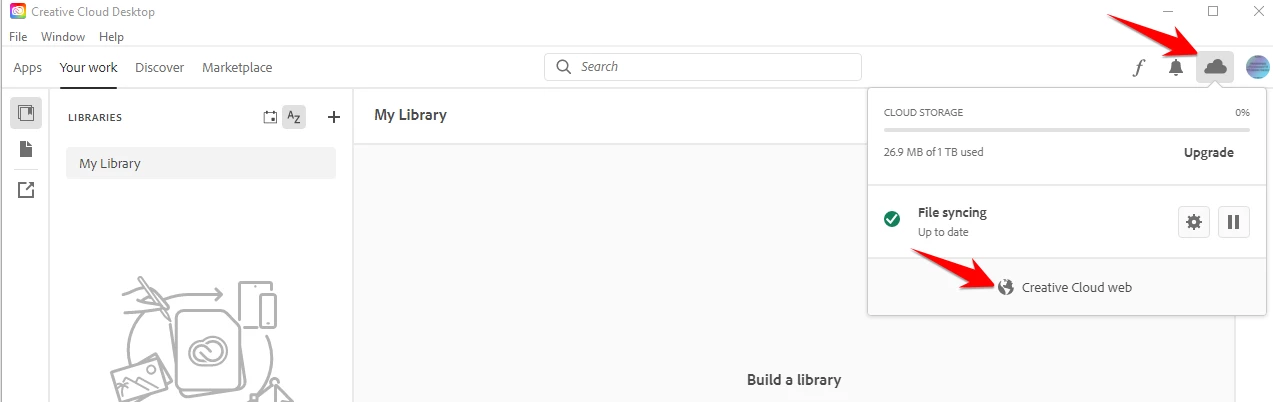
open your cc app > click the cloud icon > click go to cc web


1 reply

kglad
Community Expert
Community Expert
February 8, 2021

on your desktop with limited storage, open the adobe cc desktop app > click file > preferences > syncing > and pause syncing.


that actually stops syncing even after you close the app, shut down and restart your computer.


Participant
February 11, 2021

Right, but how do I access the files via web or something similar, alternatively?

kglad
Community Expert
kgladCommunity ExpertCorrect answer
Community Expert
February 11, 2021

open your cc app > click the cloud icon > click go to cc web