


Participant
January 29, 2024
Answered

How to change positions of titles and logos in Adobe Portfolio?

  • January 29, 2024
  • 3 replies
  • 1850 views

I am working with the 'Ludwig' theme on Pf and need to know if I can flip the positions of the pages and logo here. This means the logo is on the left of the screen and the page titles: work, play, and contact are on the right side. How can I achieve this?

Correct answer Nancy OShea

@Sofia36131197x22d 

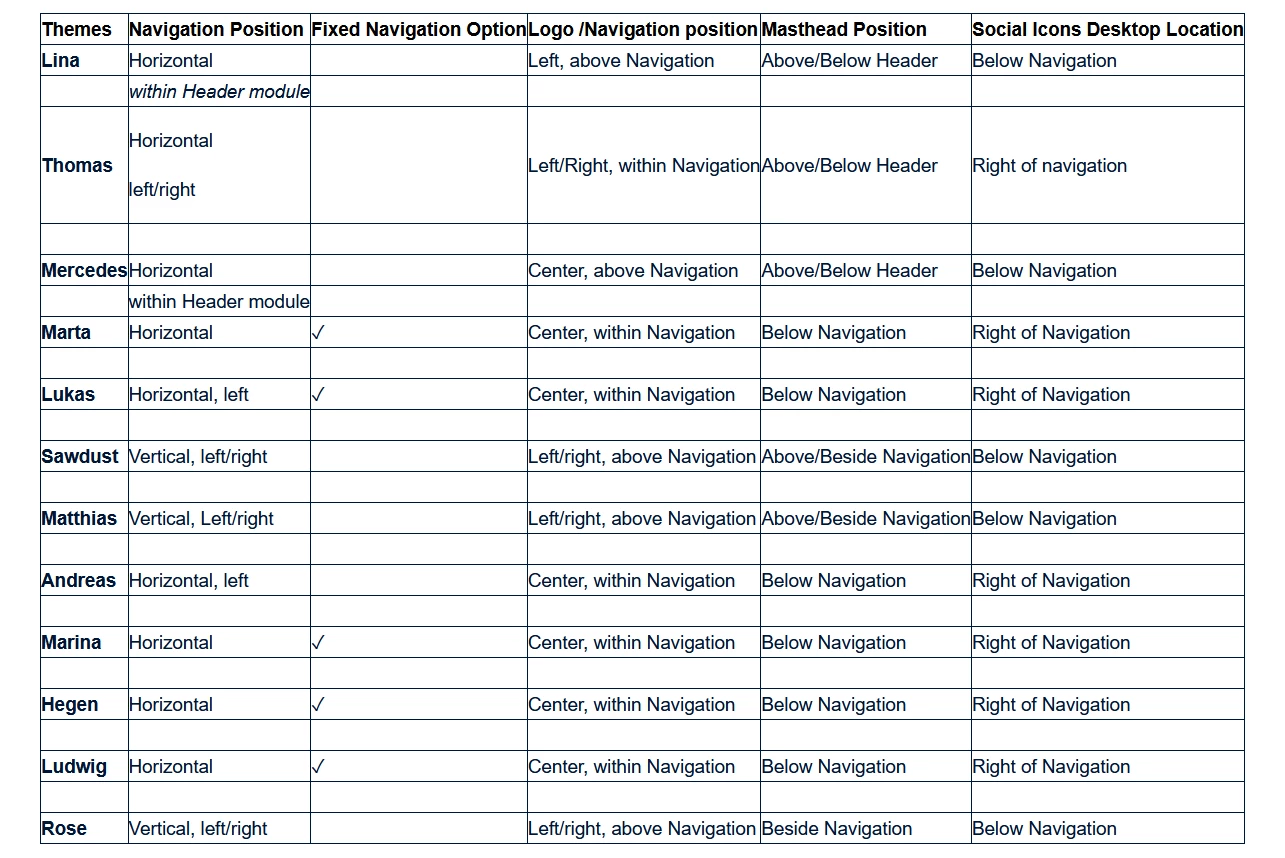
Choose a Theme that permits Logo/Navigation to be positioned where you want it.  See chart below.


Hope that helps.


3 replies

Participant
March 16, 2025

I have the same theme but my logo is in the middle and I would like it on the right as it is visible on your image. How did you do that? thanks 🙂


kglad
Community Expert
Community Expert
March 16, 2025
Participant
June 20, 2024

Did you succeed?

Nancy OShea
Community Expert
Community Expert
June 21, 2024

Adobe Portfolio offers 12 Themes, each with different layout options. Choose the right Theme for your project goals.


Comparing Portfolio Themes

https://help.myportfolio.com/hc/en-us/articles/360035496294-Comparing-themes


Nancy O'Shea— Product User & Community Expert
kglad
Community Expert
Community Expert
January 29, 2024