
IVTore
Participant
September 6, 2023
Answered

How to change the language of Creative Cloud Desktop?

  • September 6, 2023
  • 2 replies
  • 734 views

How on earth really?
I am NOT talking about the applications under CC Desktop (like photoshop etc).
That is already ok.
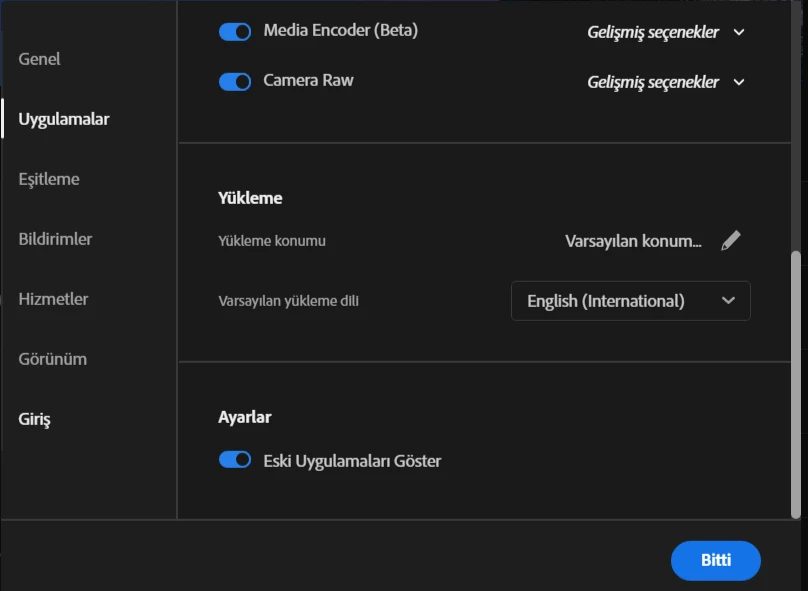
I prefer it in english, because of its wild cryptic Turkish and finding help in english is easier.
Also there are million scenarios in both personal and business use, which a program that central to applications must have a configurable language selection. 

This topic has been closed for replies.
Correct answer kglad

you cannot unless you're willing to change your os language.

2 replies

kglad
Community Expert
kgladCommunity ExpertCorrect answer
Community Expert
September 6, 2023

you cannot unless you're willing to change your os language.

IVTore
IVToreAuthor
Participant
September 7, 2023

Yep, and it is quite absurd.

kglad
Community Expert
Community Expert
September 7, 2023

you can make suggestions to adobe here:


for others, use https://www.adobe.com/products/wishform.html

John T Smith
Community Expert
Community Expert
September 6, 2023
IVTore
IVToreAuthor
Participant
September 6, 2023

Thank you but:
I specially stressed that: "I am NOT talking about the applications under CC Desktop". 
I am talking about CC Desktop itself. 

John T Smith
Community Expert
Community Expert
September 6, 2023

That is the only help link I have... try suppport (this is a public forum, not Adobe support)


Be sure to remain signed in with your Adobe ID before accessing the link below
Do be aware that wait times are sometimes long before an agent responds
.
You MUST make sure that your browser does NOT block ads, scripts, or pop-ups
You MUST also allow 'cookies' in your web browser for the link to work
This will NOT work if you are using a VPN
.
This link will go directly to the chat option
https://helpx.adobe.com/contact.html?rghtup=autoOpen
Type "Agent" in the chat box to bypass the chatbot and be connected to a person
-Meaning type in the word Agent in the lower right, without the quote " " marks
or
Twitter tweet @AdobeCare
.
Adobe does NOT do support by email, so beware of answering anyone who sends you a private message
-click for more information about scammers https://tinyurl.com/10791730