
Participating Frequently
August 13, 2022
Question

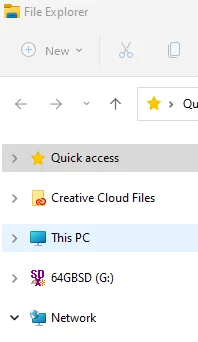
how to remove creative cloud files folder from windows file explorer

  • August 13, 2022
  • 2 replies
  • 815 views

I never use this the Adobe Cloud Folder feature but it's installed on my windows 11 in the file explorer, under the Quick Access.   There is no way to disable it or uninstall it, feels just like a Malicious malware.    And now I need help to remove it.  


I searched on Google and this has been an issue to a lot of users, for many man years.  

Thank you adobe for promoting this cloud feature with Malicious malware behavior.

I would thank you more if you can allow me to remove this nasty folder that I never use.


Sinerecerly. 


-Malware Victim


    This topic has been closed for replies.

    2 replies

    Nancy OShea
    Community Expert
    Community Expert
    August 15, 2022

    What happens when you open Windows File Explorer, click on Creative Cloud Files folder and hit DELETE key?


    On my Windows, it's located in C:\Users [your name]\Creative Cloud Files.


    Nancy O'Shea— Product User & Community Expert
    kglad
    Community Expert
    Community Expert
    August 13, 2022

    these are user-to-user forums, and you're not malware victim, Remove Creative Cloud Files folder shortcut from the Navigation panel | Windows (adobe.com)