Correct answer Faiz Yusoff

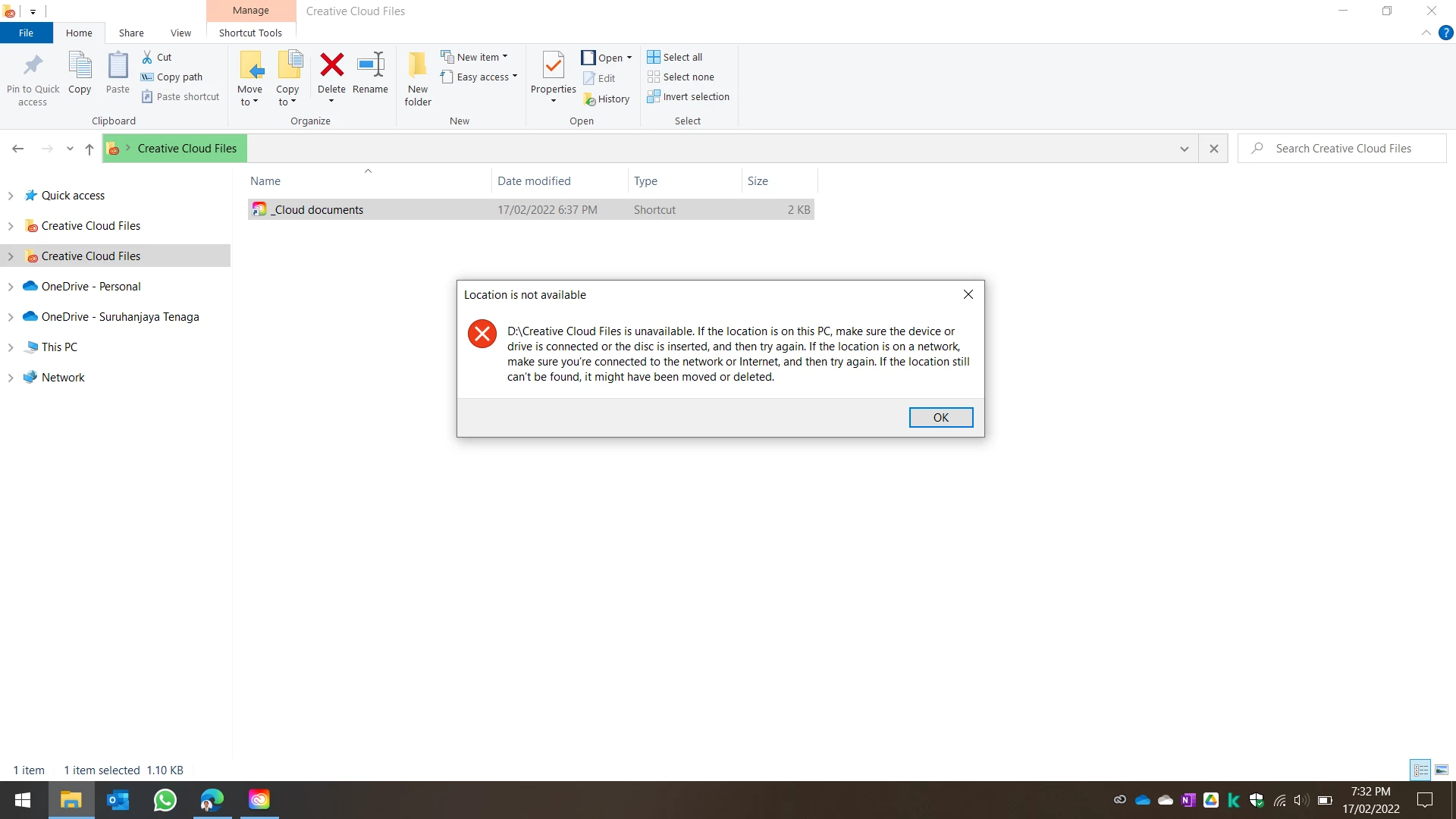
i dont think so. i have find the problem and it is related to registry editor. Apparently even after uninstall, adobe should delete the registry editor for explorer and it didnt do it. It solved by following this youtube 📂How to Remove Creative Cloud Files from the File Explorer Sidebar in Windows 10 - YouTube

2 replies

John T Smith
Community Expert
Community Expert
February 17, 2022

That is a Microsoft problem, so you need a Microsoft solution
Go to the Search bar at the top of http://www.microsoft.com/en-us/ to find information on file explorer

Faiz YusoffAuthorCorrect answer
Participant
February 18, 2022

i dont think so. i have find the problem and it is related to registry editor. Apparently even after uninstall, adobe should delete the registry editor for explorer and it didnt do it. It solved by following this youtube 📂How to Remove Creative Cloud Files from the File Explorer Sidebar in Windows 10 - YouTube

Known Participant
February 13, 2024

Thank you - i had the same problem - with this advice i could remove the file finally
The adobe Advice doesn't work

Participant
February 17, 2022

Update: i try to edit reg key put zero for name space and manage to unpin current creative cloud file, but old creative cloud still there