ryans38732083
Participant
March 9, 2017
Answered

how to work off the creative cloud and keep the files there and not on my hard drive

  • March 9, 2017
  • 1 reply
  • 3641 views

It seems my hard drive is filling up because my team and I all share the same creative cloud space which happens to be on my hard drive ....so now I'm gettin the "your hard disc is full" notifications.....is there a way that the files could be kept in the cloud and not on my hard drive?  Right now if I delete the files on my hard drive ...they will also be deleted off the cloud.

Thanks,

Ryan
This topic has been closed for replies.
Correct answer Nancy OShea

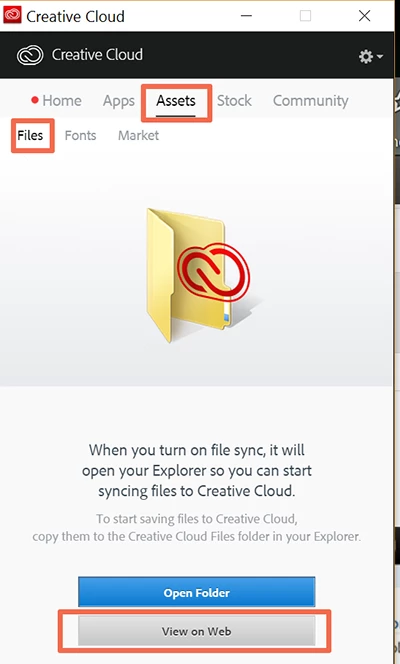
With your Creative Cloud Desktop App.  Click on Assets > Files > View on Web.

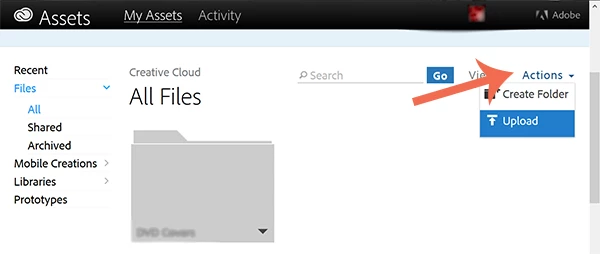
Then use Actions drop-down to Create Folder and upload files from your computer.

Nancy

1 reply

jbm007
Community Expert
Community Expert
March 9, 2017

Your files are currently being sync to your hard drive location.

the setting are under preferences ,creative cloud, files.  sync on , sync off

You can turn off sync or sync to a secondary hard drive like a USB hard drive.

ryans38732083
Participant
March 9, 2017

thanks, but then how do I manually upload the files to the cloud?

Ryan

Ken G. Rice
Community Manager
Community Manager
March 10, 2017

With file syncing off you can upload (and download) files using the CC Assets website at https://assets.adobe.com. The CC Assets does support versioning and also has comments which you can use to help with tracking the updates if wished.