Beeky123
Participating Frequently
June 10, 2021
Answered

Issues linking an Easily domain to Adobe Portfolio?

  • June 10, 2021
  • 3 replies
  • 10059 views

Has anyone had any issues linking an Easily domain to Portfolio?


I've set up the DNS entries for both the domain and www subdomain, however the "add custom URL" page is still saying this - "Oops! Looks like your domain settings have not yet been configured correctly for the www subdomain. Instructions here. (Check your DNS status here)"


I've removed all the old hosting and A entries on Dreamhost and have it set to DNS hosting only, their nameservers are set up and the Adobe custom DNS entries are in there.


My URL is just redirecting to this page - https://portfolio.adobe.com/missing


Anyone able to help?

Correct answer jamesk74068869

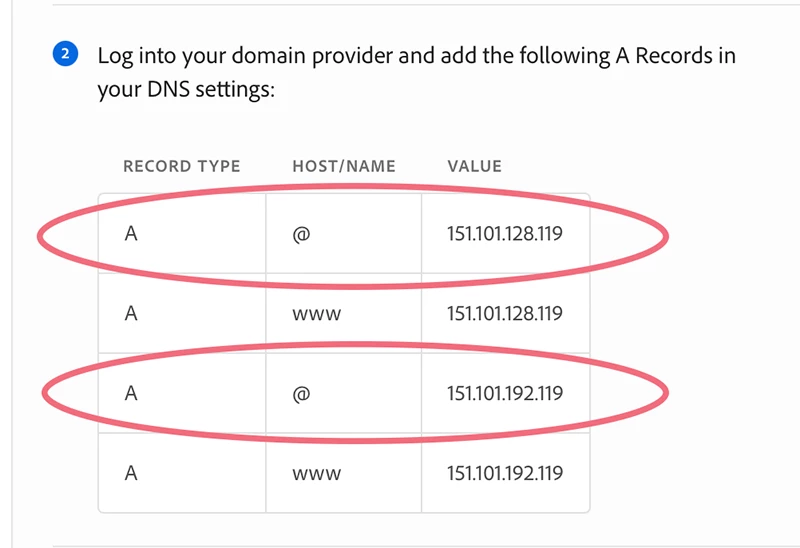
Try this (see screenshot.).


If you continue to have trouble, contact Portfolio Support.  I don't know if they respond on weekends.


my domain server wont allow 2 @ or www so i added a wildcard *   and that worked !! Thank you !!

3 replies

Participant
April 20, 2022

Just add "www" to the beginning of your domain on Adobe Portfolio. It worked for me. 


Participant
November 30, 2022

This worked for me when using custom subdomain where the main domain points to a different server. Before I was getting an error about duplicate A Records.

Participant
August 30, 2021

Did you have to delete all your other A records and only add the ones Adobe Portfolio asked you to? 


Nancy OShea
Community Expert
Community Expert
June 10, 2021

Hi @Beeky123 

Portfolio does not use the www. subdomain in it's protocol.  It's just https : // your_domain .  com


I have no idea what an "Easily domain" means, sorry. 


Did you read the chapter about connecting your custom domain to your Portfolio IP address?

https://help.myportfolio.com/hc/en-us/articles/209448927-Using-a-custom-domain-with-Adobe-Portfolio


If you continue to have problems, you might wish to consider buying a new domain name from Namecheap.com and use that with your Portfolio site.   Or reach out to Portfolio Technical support for assistance.

https://help.myportfolio.com/hc/en-us/requests/new?ticket_form_id=177168


Nancy O'Shea— Product User & Community Expert
Beeky123
Beeky123Author
Participating Frequently
June 10, 2021

"Easily" are simply my current domin host providers.

Having spoken to them and showing them the Adobe instruction, they cant seem to work out why two IP addresses, createing four (4) A Records need to be applied. They tell me it should only be 2 records???

I'm really not a techy so I am struggling to understand this myself.

Nancy OShea
Community Expert
Community Expert
June 10, 2021

I am not familiar with Easily's DNS panel.  I use Network Solutions to manage all my domains. And I only changed 2 A records, not 4.


Nancy O'Shea— Product User & Community Expert