
doj19070099
Participant
August 3, 2022
Question

Keywords of individual pages not saving or showing

  • August 3, 2022
  • 2 replies
  • 644 views

Hello,


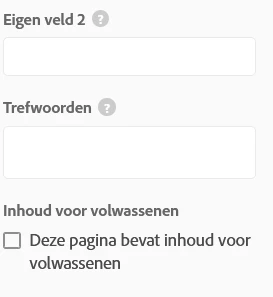
when I add keywords to individual pages and update the live site. I see none of these keywords in the page source, only the keywords added via the main site settings. Also when I go back to the page, none of the keywords I added before are saved and showing in the field where I added them. Any idea how to fix this?
 

Kind regards,

D.

This topic has been closed for replies.

2 replies

Nancy OShea
Community Expert
Community Expert
August 7, 2022

@doj19070099,

Meta Keywords are ignored by search engines. So this is an exercise in futility.


Use real text in the body of pages so humans, search engines and language translators will know what your site is about.   In the absense of any real text, your site won't gain much traction on search engines and humans will never find you.  On the web, real content is everything.


If you wish to add custom meta tags for special use cases, see below for details.  Supported custom meta tags include:

"name", "content","charset","property", "itemprop"

https://help.myportfolio.com/hc/articles/360015806633-Custom-Meta-Tags


Hope that helps.


Nancy O'Shea— Product User & Community Expert
Neelamk
Legend
August 3, 2022

Hi There,


We are sorry for your difficulties as you have issues with keywords. To understand better could you please let us know the application you are using and getting the error?


We are here to help, it's just we need more details to investigate.


Regards,

Neelam

doj19070099
Participant
August 4, 2022

I am using portfolio. I am getting no errors. I type in keywords, update the livesite. In the source code of the live site are no updated keywords. When I go back to editing the site, none of the keywords are save into the field, as shown in the image above.

Neelamk
Legend
August 4, 2022

Hi There,


Thank you for the details. I would recommend you to visit the article link below which will explain the different modules and features of Portfolio in detail.


https://help.myportfolio.com/hc/en-us


Please let me know if this helps.


Regards,

Neelam