


Participant
Feb 12, 2021 2:31 PM UTC
Question

Libraries and Your Work Panel

Hi,


I recently switched to a MacBook running macOS Big Sur 11.2.1 and in my Creative Cloud application under "Your Work" I only have one icon (Libraries) available for selection.


When I was working on a WindowsOS, I had two icons that were available for selection (Libraries + Cloud Documents).  This isn't of major concern to me because I can still access all of my cloud documents via Creative Cloud Web.  That being said, having access to both from the Creative Cloud application was convenient.


This is what I am seeing.
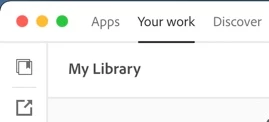
 

Please advise if there is a solution to get both icons to show up in the sidebar.


Thank you in advance

This topic is closed to new replies. Start a new post to keep the conversation going.

3 replies

kglad
Community Expert
Community Expert
Feb 12, 2021 3:10 PM UTC

first, reset the cc app:

to reset the cc desktop app, make sure it's in the foreground, then press:

Win: Ctrl + Alt + R
Mac: Cmd + Opt + R

if that fails, try to repair
https://helpx.adobe.com/download-install/kb/creative-cloud-install-stuck.html

if that fails go ahead and uninstall/reinstall per the above link

if that fails, it may not be worthwhile but if you want to preceed, do a clean cc install following each applicable step:

uninstall every cc app including preferences, https://helpx.adobe.com/creative-cloud/help/uninstall-remove-app.html
then uninstall the cc desktop app, https://helpx.adobe.com/creative-cloud/help/uninstall-creative-cloud-desktop-app.html
clean your computer of cc files per http://www.adobe.com/support/contact/cscleanertool.html
check for, and if available, update your os
restart your computer (don't skip this)
reinstall the cc desktop app, https://creative.adobe.com/products/creative-cloud.
if you're unable to install the cc desktop app at this stage, use an administrator account (solution 4 here, https://helpx.adobe.com/creative-cloud/kb/creative-cloud-missing-damaged.html)
use the desktop app to install your cc programs/trials

Translate
JCastaldoAuthor
Participant
Feb 12, 2021 3:24 PM UTC

Thank you for the assistance.  Thus far, I've only tried resetting the app.  Unfortunately, that didn't work.


I will try the remainder of the options at the end of the day.


Again, thank you for the assistance.

Translate
kglad
Community Expert
Community Expert
Feb 12, 2021 3:52 PM UTC

ouch.  that one had the best chance of succeeding.

Translate