
Talking Cat Photos
Inspiring
September 24, 2020
Question

Libraries sync error caused by CC update

  • September 24, 2020
  • 8 replies
  • 942 views

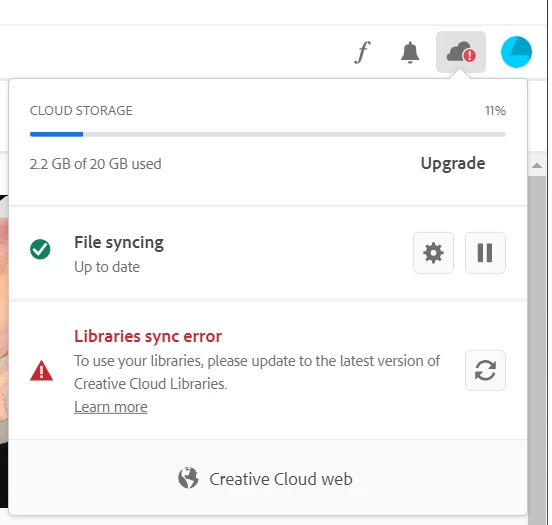
Hi I updated today my Creative Cloud to 5.3.0.468 & CC library 3.8.27.3 and I am now receiving this error (see below) that I must upgrade to the latest cloud libraries.


I have followed all the instructions at:

https://helpx.adobe.com/creative-cloud/kb/libraries-panel-not-working.html?mv=product&mv2=accc


And the problem remains. 


Can anyone (preferably an Abode technical staffer) suggest a solution that works?


Thanks!


This topic has been closed for replies.

8 replies

Mariia Novikova
Adobe Employee
Adobe Employee
September 26, 2020

Hi,

if anyone is still seeing the problem, please find the Libraries installer here (solution 1 part):
https://helpx.adobe.com/creative-cloud/kb/libraries-panel-not-working.html

Please, let me know if you are still seeing an issue.

Thank you,
Mariia

Talking Cat Photos
Inspiring
September 26, 2020

Hi Mariia, that solution did not work for me or for any of the other posters who responded to me.  What appears to have fixed the issue is a further update to Creative Cloud issue yesterday.  Please could you confirm that is the case.

Mariia Novikova
Adobe Employee
Adobe Employee
September 28, 2020

By the time you were trying the solution in the article there was still previous CCLibraries installer posted  - that's why it didn't resolve the issue, as it was the same verion as you already had. We have updated the installer, so if you would try it before you got an automatic update via CCD it would fix the Sync issue for you.
There might be some delays with automatic updates for some reasons.

Glad you got unblocked!

Thanks,
Mariia

Mariia Novikova
Adobe Employee
Adobe Employee
September 25, 2020

Hi everyone, 

We are currently posting Libraries update to the helpX page, so you would be able to pull it from there and install in case you haven't got the update with CCD for some reason.
You could try to sign out and sign in back to CCD to trigger the update.
If that still doesn't help, please DM me - will provide with the installer.

Thank you,
Mariia

Talking Cat Photos
Inspiring
September 25, 2020

Problem is fixed for me now, but niot as a result of any of the actions I took yesterday.  A further update was made to CC which appears to have made the issue go away.  I hope it stays gone

Inspiring
September 25, 2020

Have the same issue.  Have not upgraded anything but have ths same problem.  As with others have tried all the suggested fixes without any solution.  Adobe - please get this fixed asap as interfering with my workflow.

Inspiring
September 25, 2020

All of a sudden all now ok

Talking Cat Photos
Inspiring
September 25, 2020

Yes, mine is fixed now.  When I logged on again, a message came up to update Creative Cloud.  I pressed the button and then on restarting it, the problem had gone away. 

philipn95815980
Inspiring
September 25, 2020

I had this problem.  I went through the utterly ridiculous rigmarole of actions instructed by the page I was directed to, and the problem remains.  Insanity for me this morning.

Participant
September 25, 2020

Same fault here.

Participant
September 25, 2020

Now fixed by update to cc desktop released by adobe.

nielm75305285
Participant
September 25, 2020

I have had exactly the same issue. it upgraded first thin this morning and suddenly a sync error.

Running Win 10 Pro ver 1930.

AMD Ryzen 3 2200G 3.50 GHz, 48 GB RAM


Trie all the suggested fixes but no change.

Talking Cat Photos
Inspiring
September 24, 2020

PS: I am running on Windows 10 version 2004, 16GB RAM, AMD Ryzen 5 2600X six core

Participant
September 25, 2020

I am having exactly the same problem on Mac and Windows 10. Have tried the suggested fixes. Problem with Adobe not your setup.