


Participant
Apr 28, 2021 10:12 AM UTC
Question

Libraries Sync Error - Windows 10

Hi, I have gone through the other posts in the forum regarding CCS Library sync issues but nothing so far has resolved my problem. 


For example some basic/quick templates that I create on Spark I cannot see them on the Windows Create Cloud. Files seem to be able to sync correctly though. 
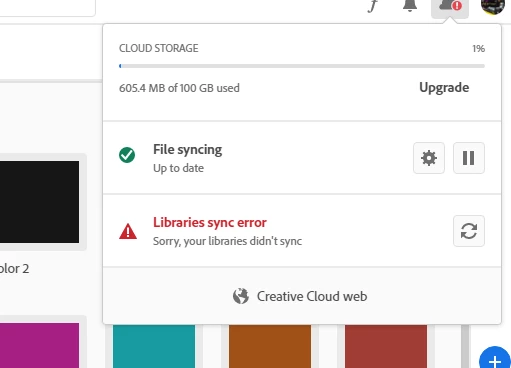
 

I have literally tried everything in here. Deleting all the adobe programs, deleting only CCS, the official guide too https://helpx.adobe.com/creative-cloud/kb/libraries-panel-not-working.html. Nothing has offered any help.


My LogCollector files ID is: AdobeLogs_20210428_100102_320-win.zip

This topic is closed to new replies. Start a new post to keep the conversation going.

3 replies

kglad
Community Expert
Community Expert
Apr 28, 2021 1:14 PM UTC

what if you go to your cc web files?  can you download from there?

Translate
Participant
Apr 28, 2021 1:39 PM UTC

yeah, from there everything looks fine. But when I use the CCS either in windows 10 or in my MacBook I get the same issue. Library sync problem. So, it is not platform (win/mac) related. Very peculiar issue. 

Translate
kglad
Community Expert
Community Expert
Apr 28, 2021 1:41 PM UTC

quit your cc desktop app

restart your cc desktop app with admin privileges

try to sync

Translate